



Backup and storage solutions
Cloud Bilişim plans business storage and backup systems using NAS, local copies and cloud copies where appropriate. Capacity, access requirements, retention and tested recovery objectives determine the design for each organisation in Türkiye.
How do you define backup recovery requirements?
Specify the maximum acceptable data loss and downtime for each critical system. Use these recovery objectives to choose copy frequency, retention, storage locations and a practical restore-testing plan.
How do local and cloud backups compare?
| Option | Planning benefit | Recovery consideration |
|---|---|---|
| Local backup | A nearby copy for local recovery workflows. | Protect against loss of the premises or shared infrastructure. |
| Cloud backup | An off-site copy in a separate environment. | Assess bandwidth, access controls and restore time. |
| Hybrid backup | Combines local and off-site copies. | Test both restore paths and agree retention across copies. |
Related services and next steps
Network maintenance services, Business software licensing, Contact Cloud Bilişim.
Storage is Not the Same as Backup
Storage is where the data resides. Backup Backup, on the other hand, is a copy of the same data kept in a separate environment and can be restored. This distinction may seem subtle, but most businesses that experience data loss make mistakes precisely here.
A sentence we encounter frequently is: “We have NAS, our backup is there.” However, purchasing NAS provides storage. If regular, versioned, and verified copies are not taken on that device, there is no backup — only a second copy of the data exists.
The difference becomes apparent when a bad day comes: when a file is deleted, when the disk fails, when ransomware runs, or when an entire server is lost.
As Cloud Bilişim, backup structures will combine local speed with external building security It is setting up in this way, and we verify that it works with regular feedback tests.
Can RAID Replace Backup?
It doesn’t pass. RAID allows the system to continue operating when a disk fails — hardware failure protects against. But when a file is deleted or encrypted, this change is immediately written to all disks. The same applies to synchronisation.
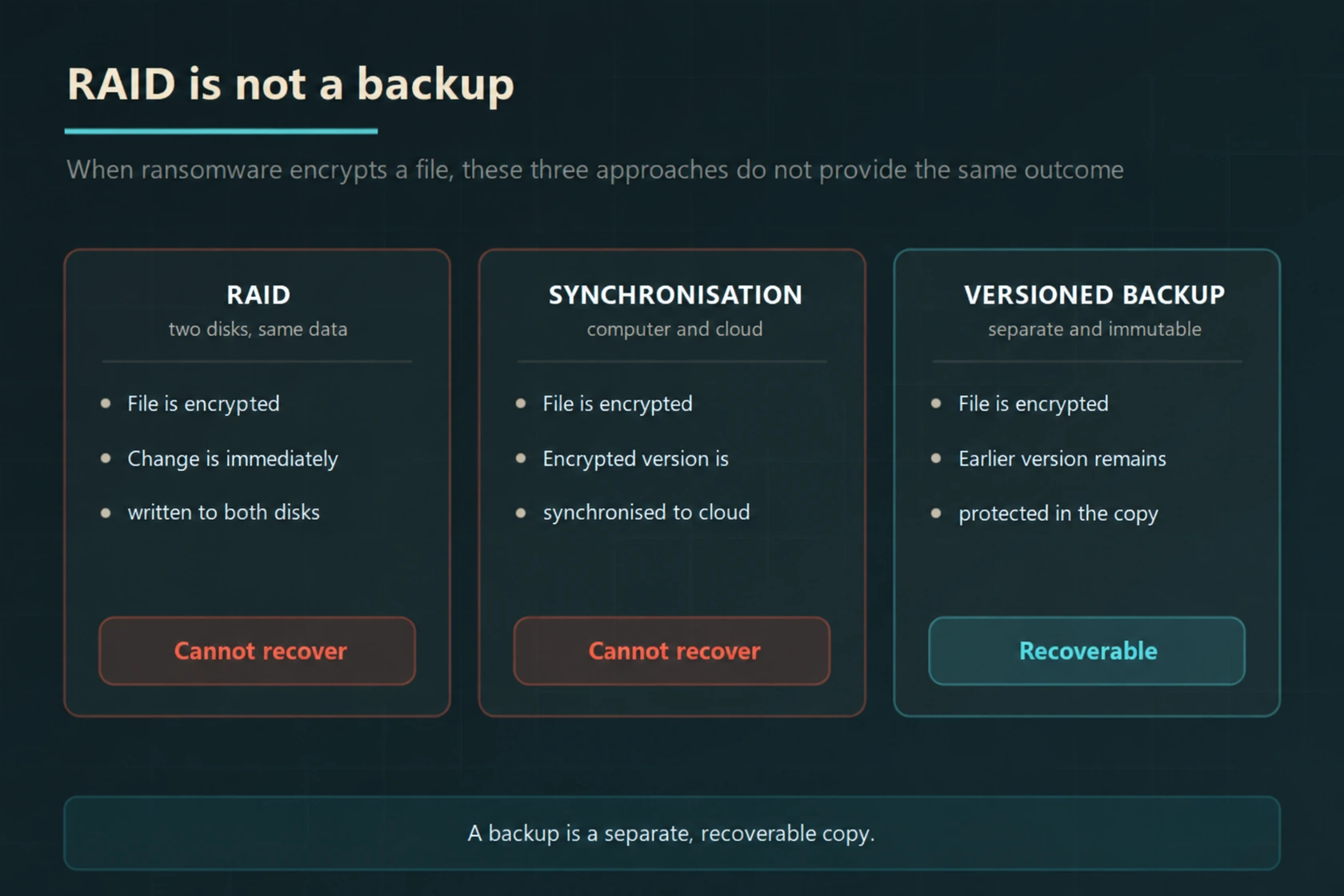
The result of the same ransomware scenario in three different environments.
What is NAS?
NAS (Network Attached Storage) is a device connected to the network that provides centralised file storage and backup. It ends the scattering of files across individual computers; it creates a single area that everyone can access, is authorised, and backed up.
In corporate projects, mostly QNAP devices are used. Devices in this class offer enterprise features such as RAID configuration, snapshot, user and group authorisation, virtualisation support, and automatic copying to the cloud.
The real power of NAS is speed: Recovery over the local network is incomparably faster than downloading from the cloud. That’s why it sits at the centre of the architecture — but it is not sufficient on its own.
What Can Be Done with NAS?
- Centralised file sharing and authorisation
- Collection of server and computer backups
- Recovery within minutes with a snapshot
- Virtual machine backup and hosting
- Storage of camera recordings
- Automatic second copy sending to the cloud
Hybrid Architecture: NAS and Cloud Together
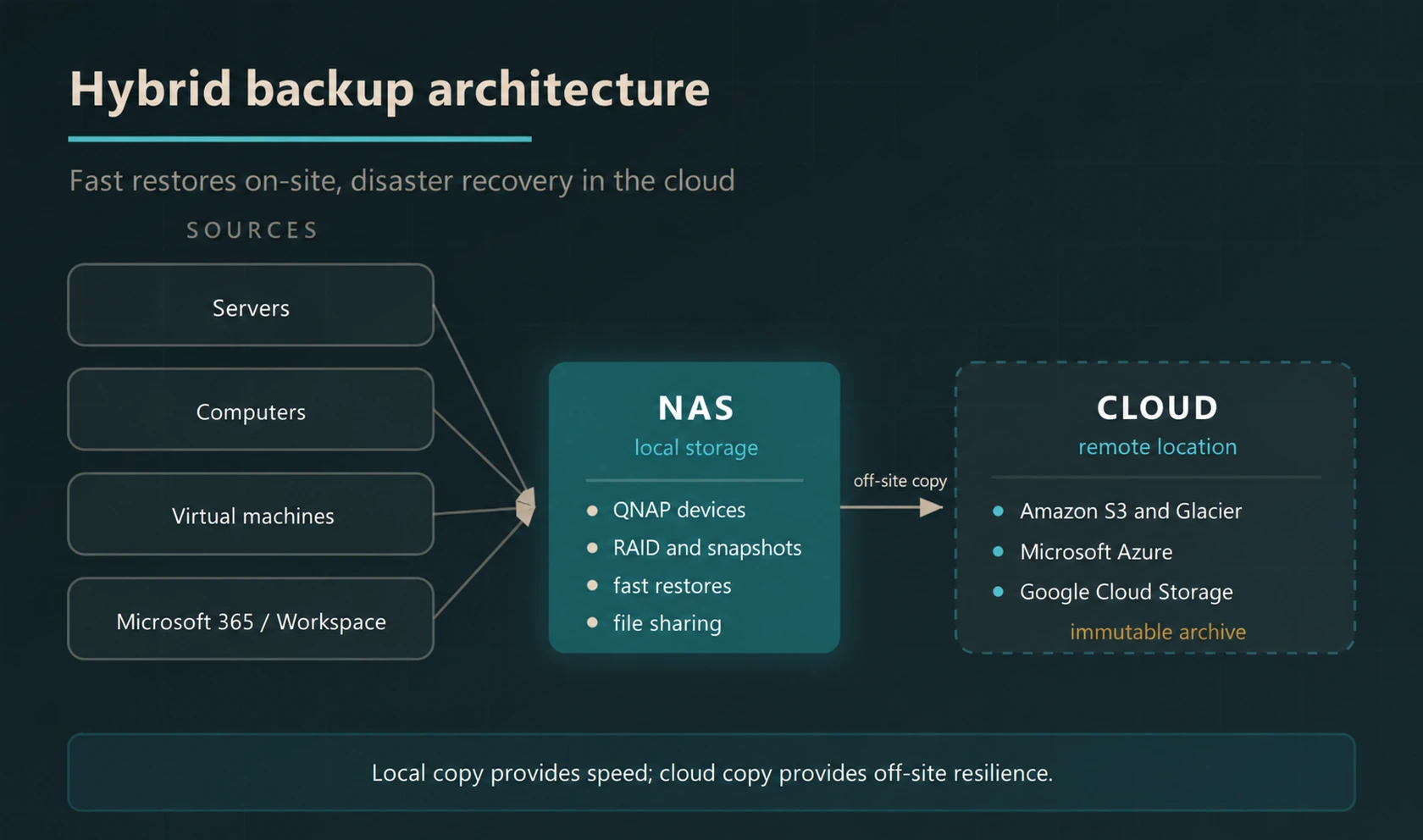
The right setup combines the two: fast recovery locally, disaster scenario in the cloud. In situations affecting the entire building such as fire, flood, theft, or ransomware, only the offsite copy is useful.
Comparison of Local Storage and Cloud Storage
| Topic | Local (NAS) | Cloud |
|---|---|---|
| Recovery speed | Very fast, over local network | Depends on internet speed |
| Offsite protection | None | Available |
| Initial cost | Device investment required | Low, pay as you go |
| Capacity expansion | By adding disks, limited | Expandable within service limits and budget |
| Maintenance responsibility | In the business | At the service provider |
| Physical risk | Fire, theft, flood | Separate from local incidents; provider and regional risks still require planning |
| Long-term archive | Disk cost accumulates | Cheap with archive tiers |
On the cloud side, according to need Amazon S3 and for archive S3 Glacier, Microsoft Azure storage and Google Cloud Storage we use. The choice is made according to data volume, access frequency, retention period, and budget.
RPO and RTO: Two Questions That Determine the Plan
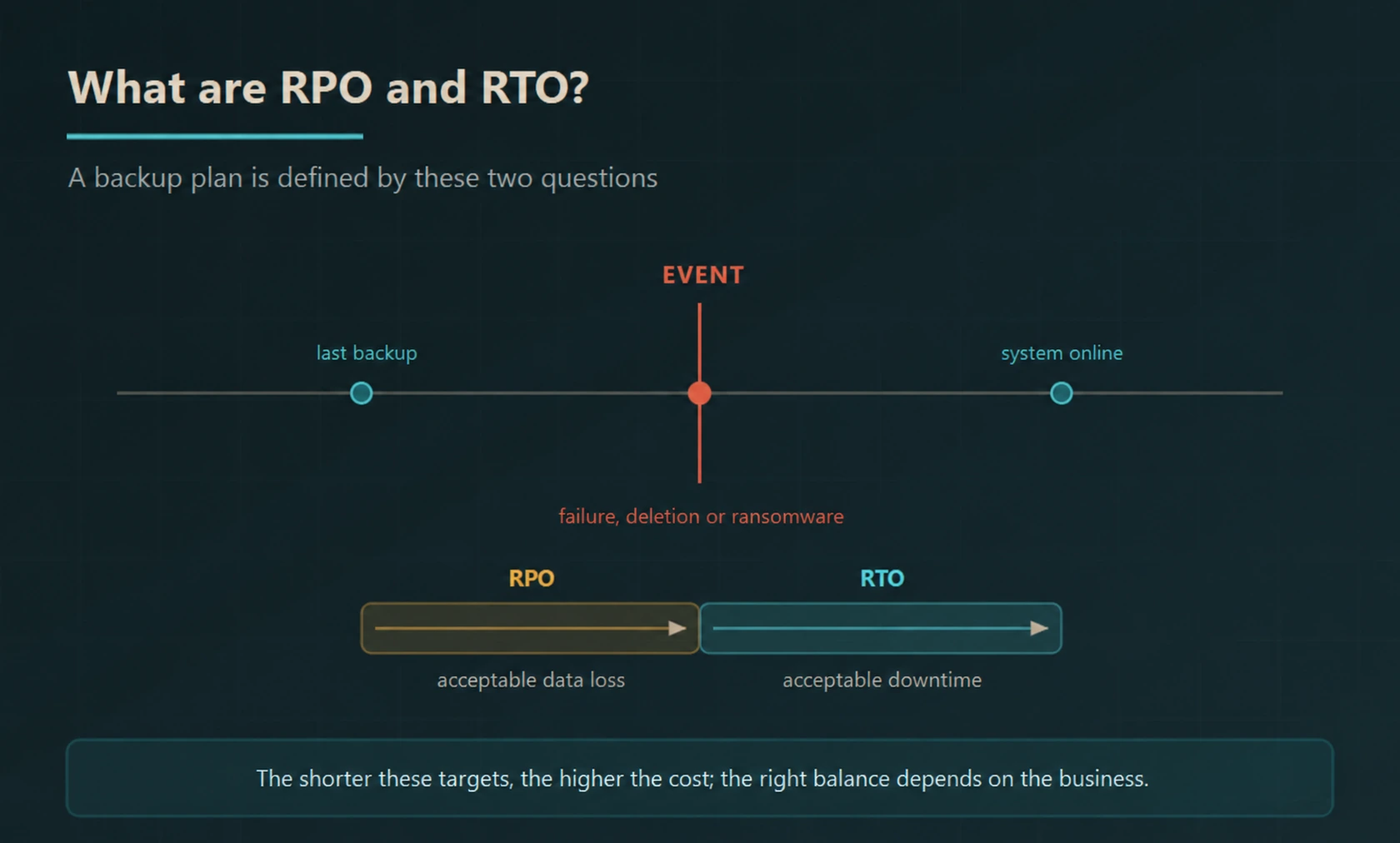
Two recovery objectives guide the backup plan: how much recent data could the business afford to lose (RPO), and how long could the service remain unavailable (RTO)? Agree these targets for each system and test whether the recovery process can meet them.
Scope of Our Service
- Data Inventory and Prioritisation
Which data is critical, how often it changes, and how long it should be retained are determined. - Determining RPO and RTO
Acceptable data loss and downtime are decided according to the requirements of the business; the solution is sized accordingly. - NAS Installation and Configuration
QNAP device selection, RAID configuration, disk sizing, authorisation, and snapshot policy are established. - Server and Virtual Machine Backup
Physical servers and virtual machines are backed up as a whole; a single file or the entire system can be restored. - Cloud Archiving
Offsite copies are created on Amazon S3 and Glacier, Microsoft Azure, or Google Cloud Storage. - Microsoft 365 and Google Workspace Backup
Emails, files, and team workspaces are stored in a separate copy.
- Versioning and Retention Policy
The number of versions and retention period are defined; daily, weekly, and monthly copies are scheduled. - Immutable Backup
Copies that cannot be deleted or altered are created for a specified period; the level of protection depends on the chosen technology, retention lock, and access permissions. - Encryption
Backups are encrypted both during transfer and at rest. - Monitoring and Alert
Failed backup jobs are reported immediately; failed jobs are evaluated through tracking alerts and regular restoration tests. - Regular Restoration Test
Not the backup taken, but the restoration is regularly tested and the results are reported. - Disaster Scenario Rehearsal
In critical structures, the raising of the entire system is tried as a drill.
An untested backup is not considered a backup. The most common situation we encounter is that the backup has been failing for months and no one has noticed. That is why in every structure we set up, a recovery test is regularly conducted and the result is reported.
What should a NAS and backup proposal include?
Storage space, disk redundancy, and independent backup copy meet different needs. Alone, redundancy may not be sufficient against disk failure, accidental deletion, or total device loss.
Evaluate the usable capacity in the offer, the annual data growth, the retention period of versions, and the protection of backups with separate access permissions. The recovery test should cover not only opening the file but also folder permissions and application consistency if necessary.
For frequently needed recoveries, a local copy can provide an advantage. Copies in different locations should also be planned for scenarios involving loss of the building or main system. Remote copy options can be evaluated together with our enterprise cloud backup service.
Frequently Asked Questions
Is storage the same as backup?
No. Storage is where the data resides. Backup, on the other hand, is a copy of the same data kept on a separate medium and can be restored. Buying a NAS device provides storage; if regular, versioned, and verified copies are not made to that NAS, a backup is not created.
Does RAID replace backup?
No. RAID allows the system to continue operating when a disk fails; it provides protection against disk failure. However, when a file is deleted or encrypted by ransomware, this change is immediately written to all the disks. RAID protects against hardware failure, not data loss.
Is Google Drive or OneDrive synchronization considered a backup?
It is not considered standalone. Synchronisation reflects changes on the computer to the cloud; when a file is deleted or encrypted, this change is also reflected. The version history of these services provides some level of protection, but the retention period is limited. A separate backup solution is needed for corporate data.
What is the 3-2-1 rule?
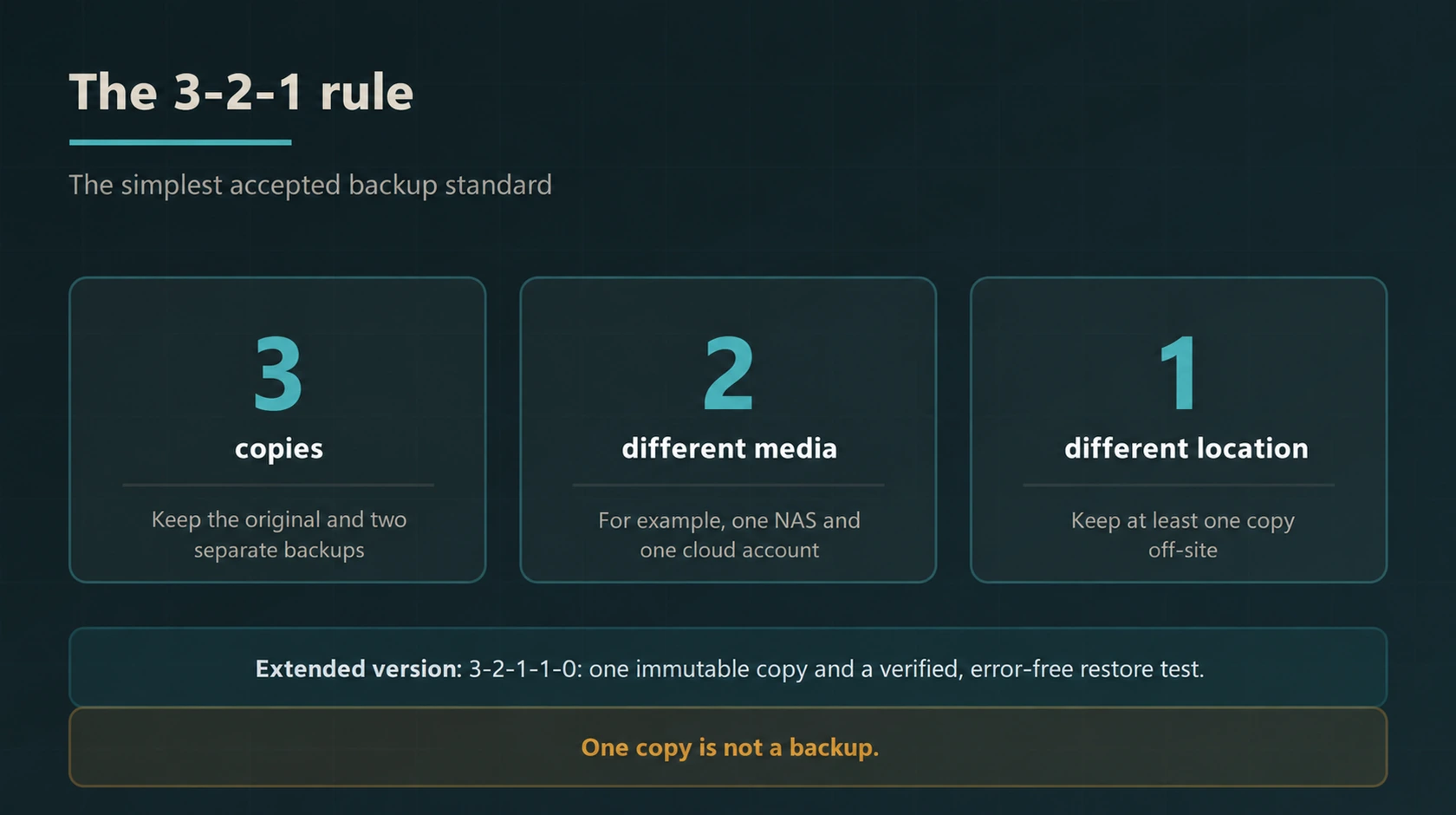
The 3-2-1 rule is the simplest standard accepted in backup: there should be three copies of the data, these copies should be stored on two different media, and at least one copy should be kept offsite. The extended version is 3-2-1-1-0: one copy should be immutable, and the restoration test should pass without errors.
What is NAS, is it suitable for my business?
NAS (Network Attached Storage) is a device connected to a network that provides centralised file storage and backup. Enterprise NAS devices like QNAP offer features such as RAID configuration, snapshots, user permissions, and automatic cloud replication. It is suitable for businesses of all sizes that have growing data volumes, share files, and require fast recovery.
Which cloud storage services do you use?
Depending on the need, we use Amazon S3 and S3 Glacier for archiving, Microsoft Azure Storage, and Google Cloud Storage. The choice is made according to data volume, recovery frequency, retention period, and budget. Low-cost archive tiers are preferred for infrequently accessed archival data.
Should Microsoft 365 and Google Workspace data be backed up?
Yes. The storage and recovery capabilities of these services vary according to the product, licence, and configuration; it should also be evaluated whether it meets the organisation’s recovery needs. It is recommended to keep a separate backup of email, files, and team workspaces.
What are RPO and RTO?
RPO (Recovery Point Objective) expresses the acceptable data-loss window, measured in time. RTO (Recovery Time Objective) is the target maximum time to restore a disrupted service. These are planning targets, not automatic guarantees; backup frequency, recovery procedures and testing must support them.
Our Relevant Services
Backup is the last line of defence against ransomware; for the previous layers AI-based antivirus programs and Business firewall solutions you can check our pages. If you are only curious about the cloud side cloud backup, for monitoring the entire infrastructure corporate maintenance agreement services, for backup software licences software licensing solutions and for server infrastructure cloud server services our pages may be relevant.
Is Your Backup Really Restoring?
Which data is currently being backed up, when was the last successful backup taken, do you have an off-site copy, and most importantly: has this backup ever been restored before? We review your current setup, identify the shortcomings, and propose a solution in line with your RPO and RTO targets.
For evaluation you can contact us.