


Guest Wi-Fi and hotspot solutions
Cloud Bilişim provides guest Wi-Fi and hotspot solutions for businesses and shared spaces in Türkiye. Captive portals, SMS verification where required, session rules, bandwidth and logging are planned around each location’s coverage and usage needs.
What should a guest Wi-Fi assessment cover?
Review coverage, expected concurrent users, internet capacity and session requirements separately. Agree captive-portal content, any SMS workflow, bandwidth rules, record access and retention before rollout.
Related services and next steps
Business cloud backup, Managed cloud server services, Contact Cloud Bilişim.
What is a Hotspot?
Hotspot is a system where a business opens its internet connection wirelessly to its guests, verifies users’ identities, and keeps legal logs of this access. The difference from freely sharing a Wi-Fi password is clear: each user is verified, and every access is logged.
A shared Wi-Fi password alone does not meet the need for session management and registration. The hotspot helps manage guest access and associate it with records; legal obligations should be additionally evaluated according to the institution’s activities and usage conditions.
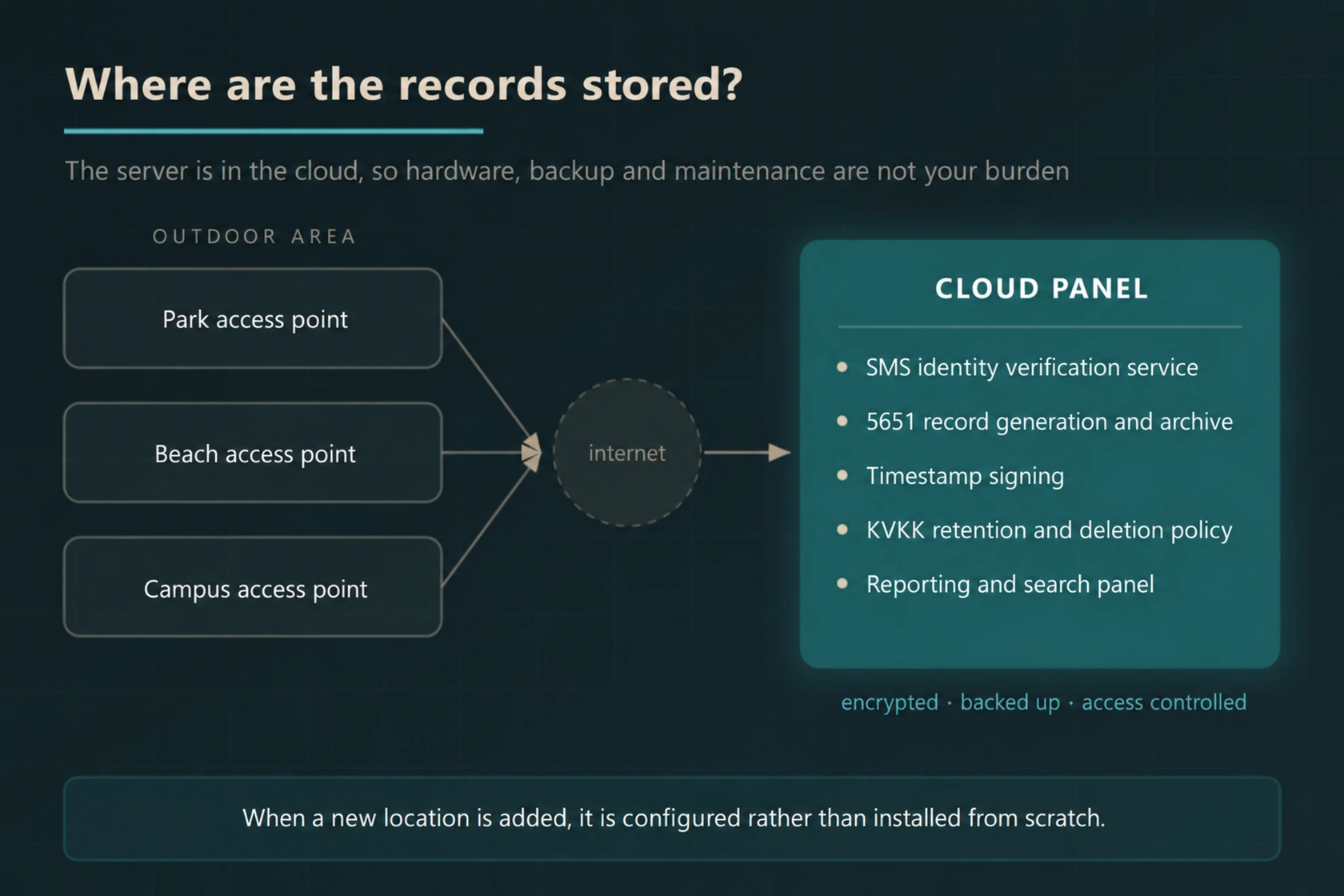
We are setting up the hotspot infrastructure as Cloud Bilişim on the cloud . Authentication, record generation, archiving, and reporting are carried out in the cloud; there is no need to install a log server on-site, take backups, or deal with hardware maintenance.
In One Sentence
You provide Wi-Fi to your guests in both open and closed areas; users are verified via SMS, records within the scope of law 5651 are kept in the cloud in compliance with KVKK, and you manage all your locations from a single panel.
Can a Hotspot Be Installed in Open Areas?
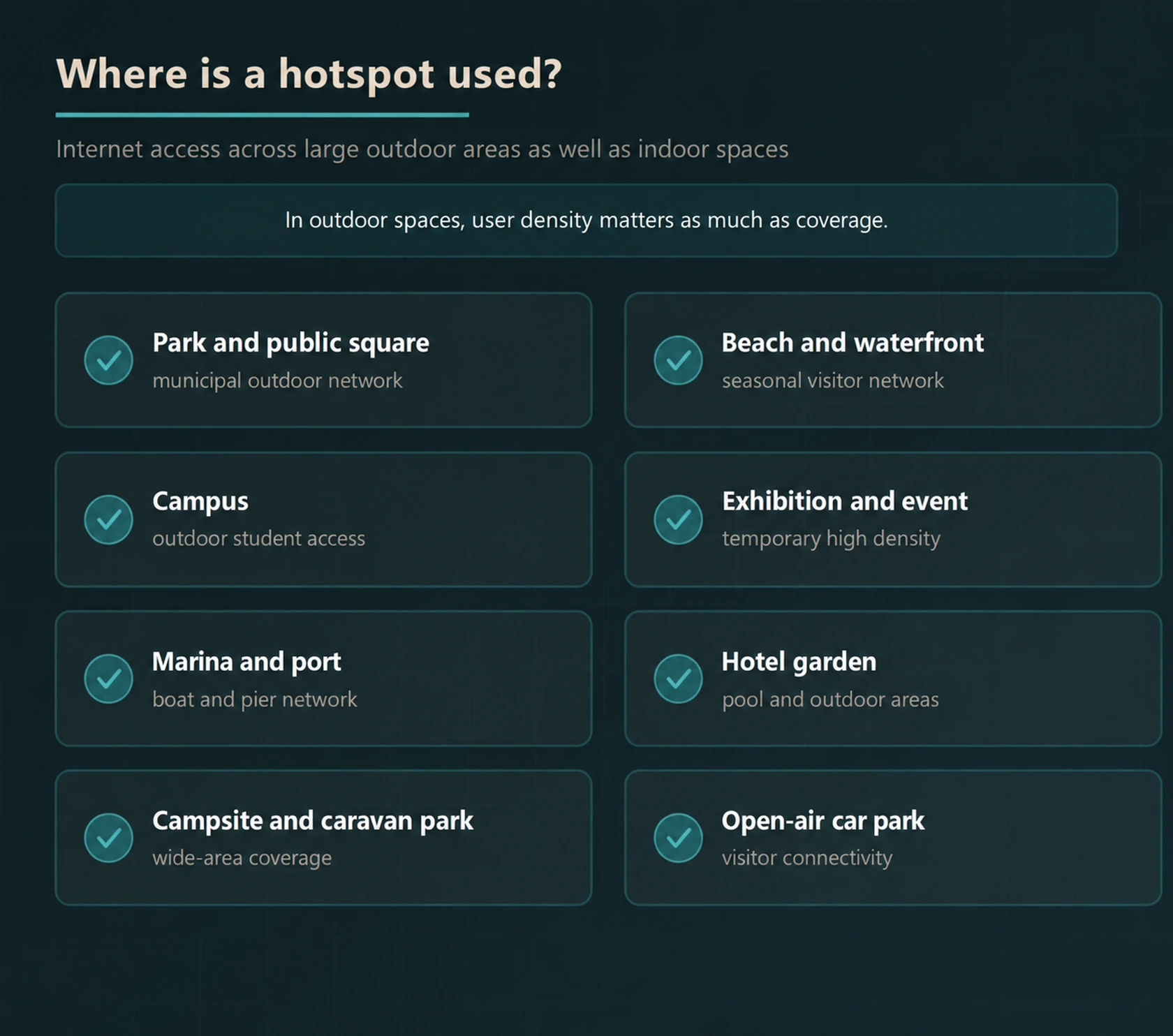
Yes. Hotspots are installed in large areas such as parks, squares, beaches, campuses, marinas, fairgrounds, campsites, and open parking lots with outdoor access points.
In open areas, the main difference from closed areas is not coverage, but the simultaneous user density. Thousands of people try to connect at the same time in a festival area; the number, capacity, and positioning of access points must be planned accordingly.
We conduct field measurements to create a coverage map, size the capacity according to density estimates, and install it with equipment resistant to external conditions.
How Does SMS Verification Work?
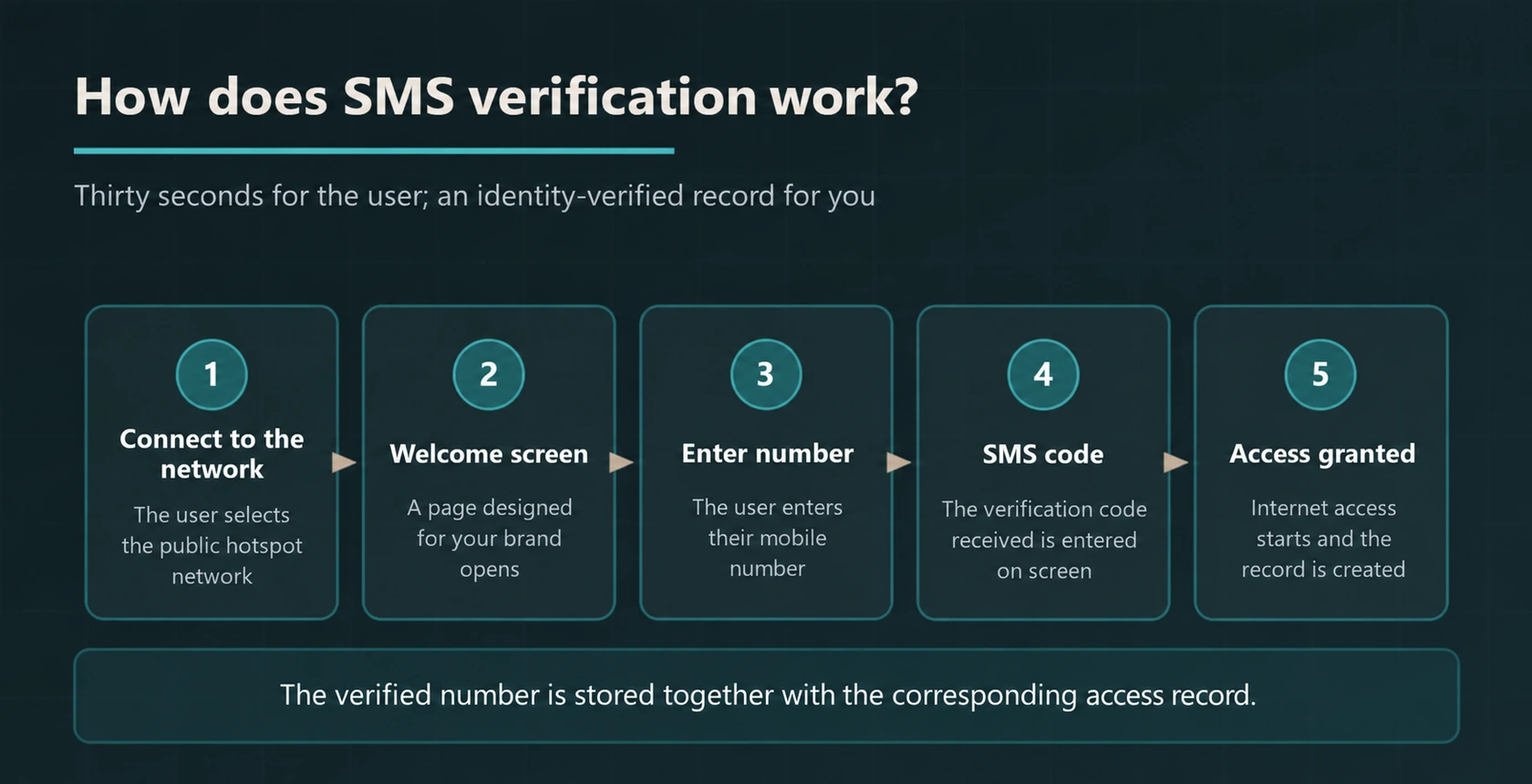
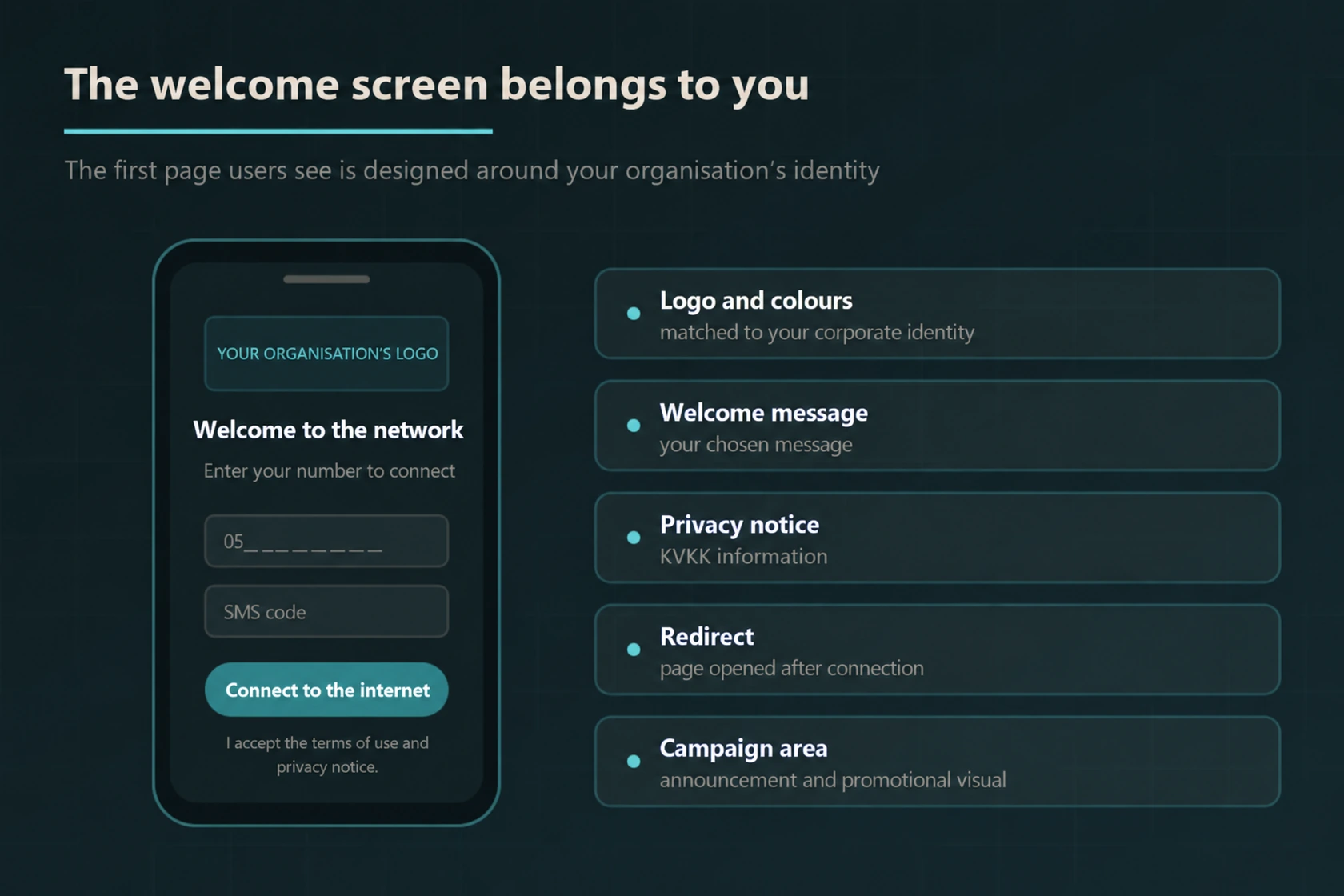
When the user selects the hotspot network, the welcome screen opens, they enter their mobile phone number, and input the received SMS code. Once the code is verified, internet access is granted, and a record is created simultaneously. This step takes about 30 seconds for the user, and for you, it means a verified record.
Where Are the Records Stored?
Records are stored in the cloud infrastructure, in an encrypted and backed-up manner. Access to records is authorised through roles, and access activities are also logged separately.
The practical implication of this is as follows: there is no log server maintained at your location. The disk does not fill up, backups are not forgotten, device failure does not turn into data loss.
For details on the legal aspect 5651 logging solutions .
Difference Between Cloud Hotspot and On-Premise Hardware
| Topic | Cloud hotspot | On-premise log server |
|---|---|---|
| Installation | Access point is installed, defined on the panel | Server, licence, and installation required |
| Backup | Automatic and redundant | Responsibility of the business |
| Hardware failure | No risk of data loss | Disk failure may lead to data loss |
| Update | Done by the provider | Must be tracked manually |
| New location | Defined on the panel | Separate installation for each location |
| Multi-location management | From a single panel | Separate management per location |
| Initial cost | Low, subscription-based | High, hardware investment |
Is the Welcome Screen Customisable?
Yes. The first page seen by the user is prepared with your institution’s identity: logo, colours, welcome text, KVKK lighting text, page to be redirected after the link, and campaign area.
This screen is a marketing space for most businesses. You can direct your guest to your own website, menu, campaign page, or social media account.
Scope of Our Hotspot Solutions
- Field Measurement and Coverage Plan
The number and location of access points are determined by measuring the area size, obstacles, and expected user density. - Outdoor Hardware Installation
Outdoor access points that are resistant to rain, dust, heat, and cold are installed, and power and network infrastructure is set up. - SMS Authentication
Users are verified with their mobile phone number; e-Government and corporate account verification options can also be added. - Brand-Specific Welcome Screen
Logo, colour, text, lighting text, and guidance are arranged according to your institution. - 5651 Compatible Record Generation
Internal IP distribution records are generated, signed with a timestamp, and made unalterable. - Encrypted Cloud Archiving
Records are kept in a redundant and encrypted manner for the period prescribed by regulations.
- KVKK Retention and Destruction
Data minimization is observed; the destruction process is automatically executed at the end of the retention period. - Multi-Location Management
All branches, facilities, and open areas are managed from a single panel; new location setup requires definition, not installation. - Bandwidth and Time Limit
Speed and time limits are defined per user to ensure fair sharing of the line. - Content Filtering
Access to content that constitutes a crime and is against your institution’s policy is blocked. - Reporting and Querying
Usage statistics, peak reports, and record queries upon official request can be done from the panel. - Post-Installation Support
Monitoring, updates, and fault intervention are carried out under the maintenance agreement.
Do you want to purchase the product?
For businesses that want to directly purchase the hotspot solution, our product CloudWiFi is offered through. You can examine the packages and complete the purchase from there.
For institution-specific installation, site measurement, and multi-location projects you can contact us.
Separate coverage and session management in the Hotspot project
Logging into the guest welcome screen and having healthy Wi-Fi access throughout the venue are different issues. Access point placement, the number of simultaneous users, and the internet line should be evaluated separately from the portal and authentication flow.
Specify the number of locations in the proposal, the costs of verification services like SMS, session duration, and speed limits per user. The guest network should be separate from the institution’s internal systems, and responsibility for support in case of connection issues should also be included.
The SMS code verifies access to the relevant phone number; it should not be considered on its own as legal identity verification or a guarantee of full regulatory compliance. For the records to be collected and the retention policy 5651 logging solutions Its scope should also be evaluated.
Frequently Asked Questions
What is a hotspot?
A hotspot is a system where a business opens its own internet connection wirelessly to its guests, verifies the identity of users, and keeps legal records of this access. The difference from sharing a free Wi-Fi password is that each user is verified and each access is recorded.
Can a hotspot be set up outdoors?
Yes. Hotspots can be set up with outdoor access points in large areas such as parks, squares, waterfronts, campuses, marinas, fairgrounds, camping areas, and open parking lots. In outdoor areas, the main issue that differs from indoor areas is not coverage, but the user density connected at the same time; the number and capacity of access points are planned accordingly.
How does verification via SMS work?
When the user selects the hotspot network, a welcome screen opens, they enter their mobile phone number, and type the SMS code they receive on the screen. Once the code is verified, internet access is opened and a record is created simultaneously. The entire process takes approximately 30 seconds for the user.
Where are hotspot records stored?
Records are stored in the cloud infrastructure in an encrypted and backed-up manner. You do not need to set up a log server on site, take backups, or perform hardware maintenance. Access to records is authorised, and access activities are also recorded.
Is the Hotspot solution 5651 compliant with the law?
Yes. The user identity is verified, internal IP allocation records are generated, records are signed with a timestamp making them tamper-proof, and they are retained for the period prescribed by legislation. When an official request is made, records for the relevant period can be reported from the panel.
How is compatibility with KVKK ensured with Hotspot?
The collected data is limited only to what is required by legislation, users are informed with a disclosure text at the moment of connection, access to records is restricted by roles, and the destruction process is automatically carried out when the retention period expires.
Can the welcome screen be customised?
Yes. The logo, colours, welcome text, disclosure text, the page to be redirected after connection, and campaign area can be adjusted according to your institution.
Can multiple locations be managed from a single panel?
Yes. All locations are managed through the same cloud panel. When a new location is added, a separate server installation is not required; the location is defined on the panel.
Our Relevant Services
Hotspot infrastructure gains meaning when combined with properly configured network security. For the legal record side, you can check our pages 5651 logging solutions, for network entry protection Business firewall solutions, and for your cloud-side infrastructure needs cloud server services and cloud backup .