



Business software licensing
Cloud Bilişim provides software licensing support for businesses: we help you select licences and plan renewals. We review product edition, user or device count, deployment rights and subscription terms together, so the licence matches how you will use it.
What should you check in a software licensing quote?
Compare the same product edition, version, user or device metric, term and deployment rights. Before you compare prices, check whether the quote includes server access licences, support, renewal and transfer rights.
Related services and next steps
Managed IT support in Istanbul, Backup and storage solutions, Contact Cloud Bilişim.
One-Stop Software Licensing for Businesses
Software licensing is a service that keeps all software a business uses properly licensed. It covers choosing the right package and quantity, and renewing licences before they expire.
In practice, the hard part for most businesses is not buying the licence but knowing which one they need. Which Microsoft 365 plan fits? Does the server need CALs, and how many? What happens when the firewall subscription expires? Should you choose Google Workspace or Microsoft 365?
The manufacturer’s price list does not answer these questions, because the answer depends on how you work. That is why we start by understanding your needs, not by selling a product.
We supply licences from Microsoft, Google, security vendors and many other manufacturers through a single source. As a result, you do not need a separate supplier for each product.
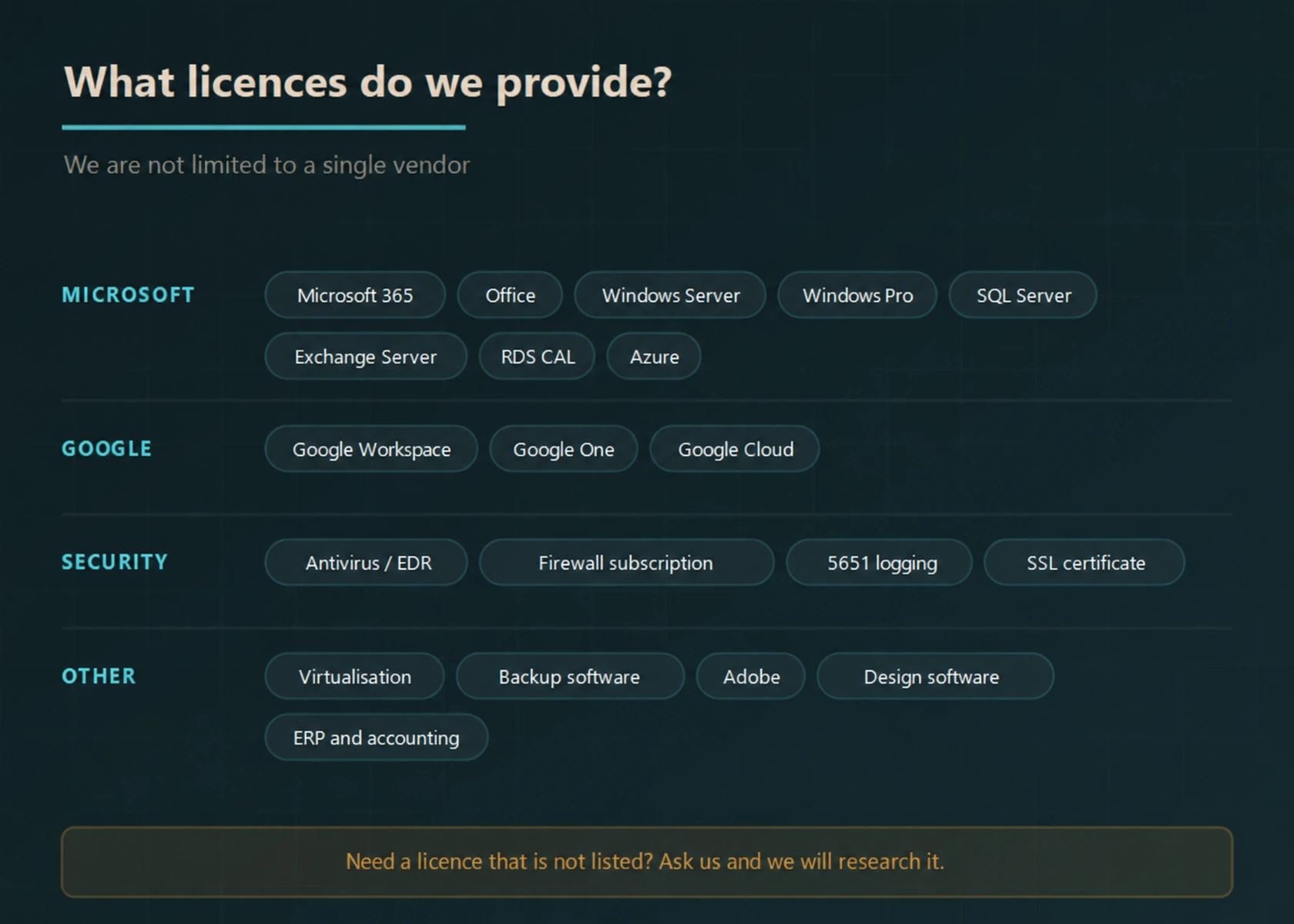
Is the licence you need missing from the list? The list shows the most requested items, not everything we supply. We also research sourcing for industry-specific software, engineering and design programs, niche tools and products from foreign manufacturers. Tell us what you need and we will look into it: contact
Licences We Provide
| Category | Licences | For what |
|---|---|---|
| Microsoft 365 and Office | Microsoft 365 business packages, Office applications, perpetual Office licences | Email, office applications, cloud storage, and collaboration |
| Microsoft Server | Windows Server, Server CAL, RDS CAL, SQL Server, Exchange Server | Server operating system, database, remote desktop, and access licences |
| Microsoft Client | Windows Pro and Enterprise, Azure subscriptions | Computer operating system and cloud infrastructure |
| Google Workspace, Google One, Google Cloud | Email, documents, storage, and cloud services | |
| Security | Antivirus and EDR licences, firewall subscription renewals, 5651 logging software, SSL certificates | Endpoint protection, network security, legal recording, and encrypted connection |
| Infrastructure | Virtualisation platforms, backup software | Server virtualisation and data backup |
| Application | Adobe products, design and engineering software, ERP and accounting software | Department-specific business applications |
Why choose genuine software licences?
Legal
Using unlicensed software infringes copyright. If an audit finds it, the business can face penalties and costs well above the price of the licence. The manufacturer’s official Microsoft licensing terms show how detailed these usage rights are.
Security
Unlicensed and cracked software does not receive security updates. In addition, the sites that distribute such software are a common source of malware.
Support
Only a valid licence gives you the right to manufacturer support when a problem occurs. With an unlicensed installation, you are on your own.
Subscription or Perpetual Licence?
| Topic | Subscription | Perpetual licence |
|---|---|---|
| Payment | Monthly or yearly, regular | One-time |
| Version | Always up-to-date | Stays on the purchased version |
| Number of users | Flexible, up or down | Fixed |
| When the period ends | Usage stops | Usage continues |
| Upgrade to new version | Included | Extra purchase |
| Suitable for | Businesses with variable staff, wanting the latest version | Businesses with fixed staff, not wanting to change version |
CAL: Most Common Licensing Error
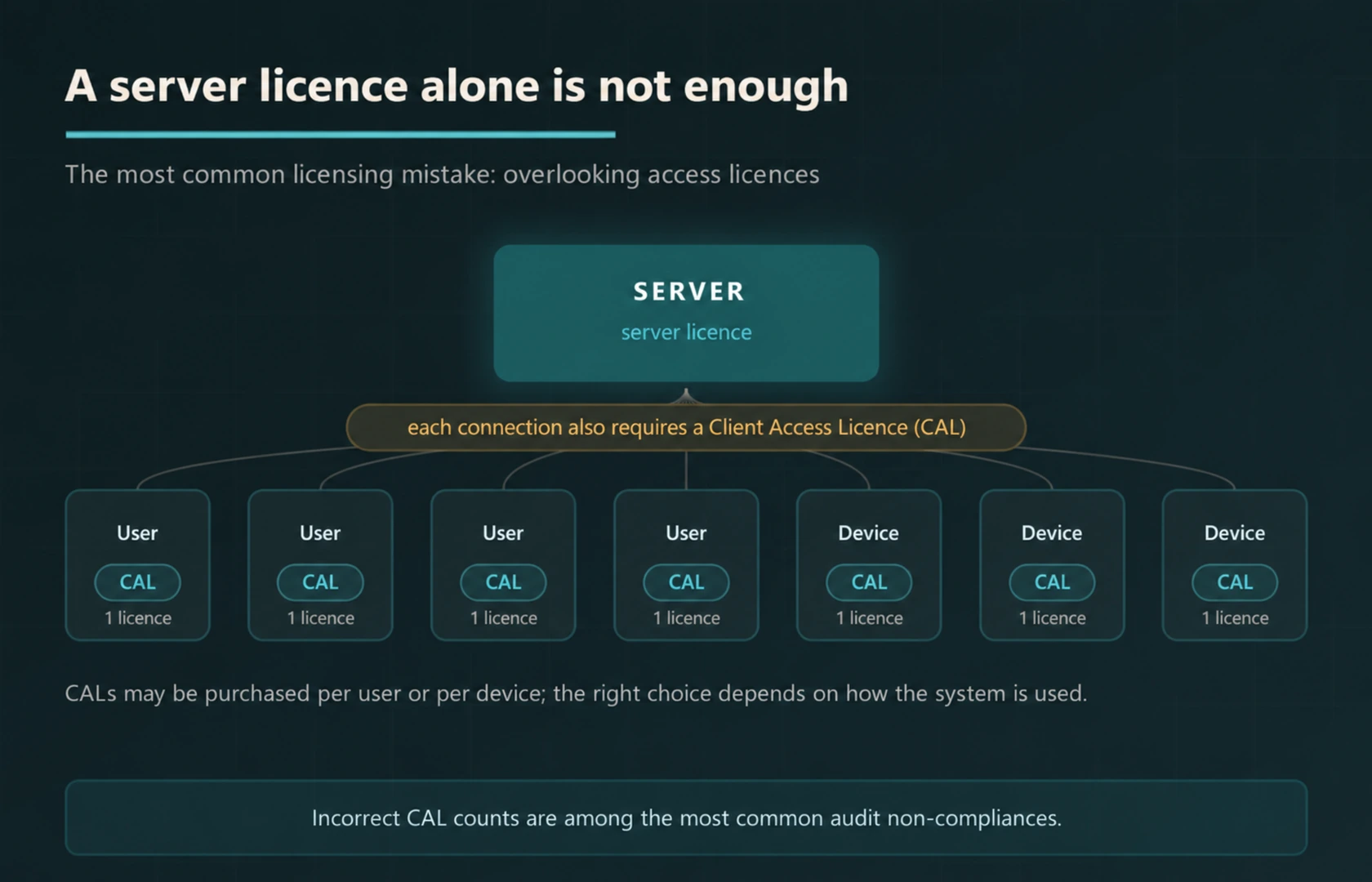
Products like Windows Server need a licence for the server itself. In addition, they need a CAL (Client Access Licence) for each user or device that connects to the server. The belief that “the server licence is enough” is one of the most common gaps that licence audits find.
We Track Software Licensing Renewals
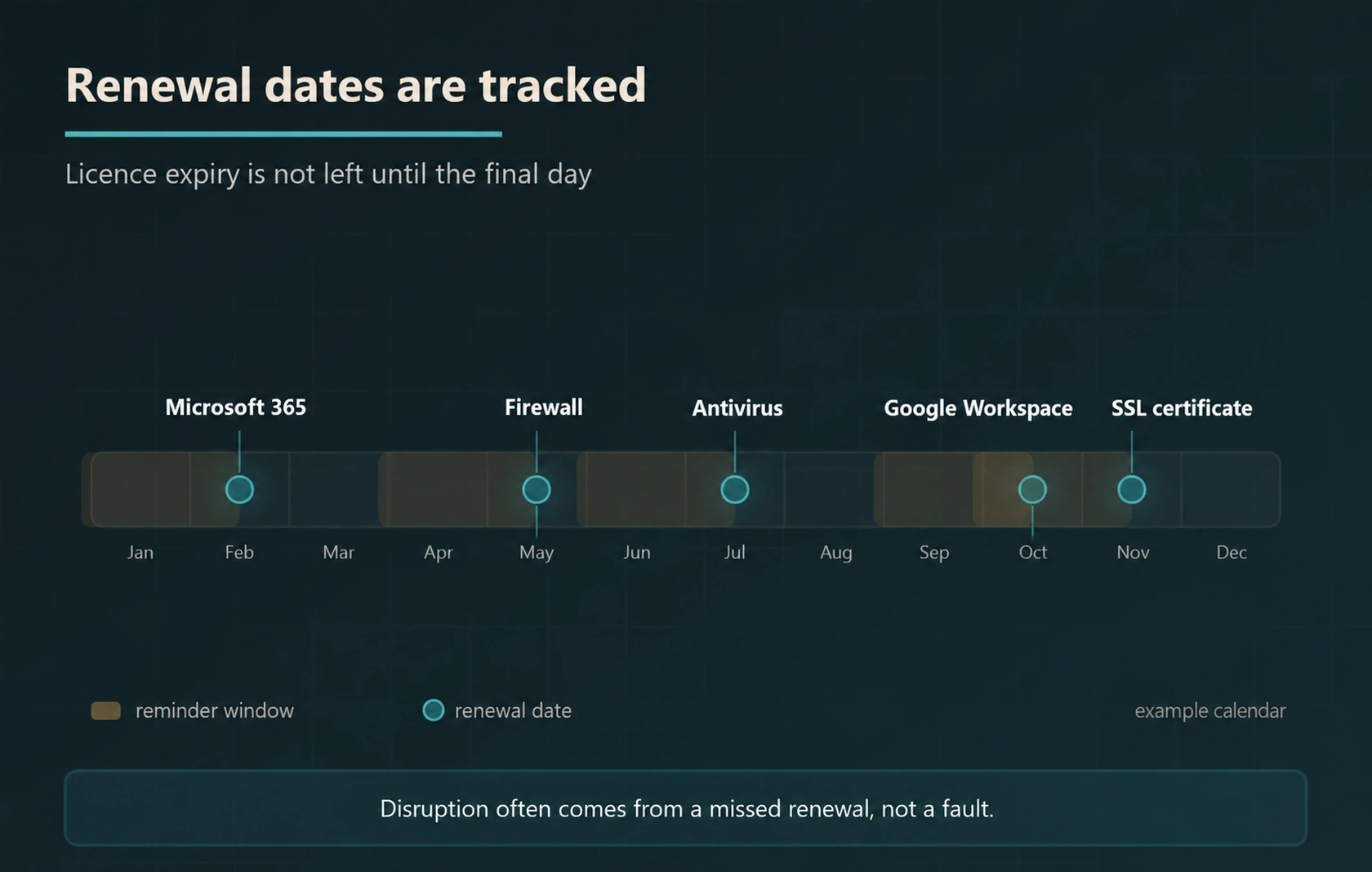
When an antivirus or firewall subscription expires, the device keeps working but protection stops. Threat signatures stop updating and filtering services shut down. Many businesses only notice this after an incident.
For customers under our maintenance agreement, we track renewal dates and send reminders before each term ends.
Scope of Our Software Licensing Service
- Needs Analysis
How many users, which applications, which way of working? Your answers point to the right package. - Licence Inventory
We record which software runs on how many devices and when each licence expires. - Compliance Audit
We close licence gaps, find unused licences and cut unnecessary spending. - Procurement
We buy licences through the manufacturer or an authorised distribution channel and register them in your organisation’s name. - Installation and Activation
We install and activate licences, then assign them to the right users. - User Transfer
We reassign licences when staff join or leave, so licences do not sit idle.
- Renewal Tracking
We monitor end dates and remind you before expiry, which helps you avoid interruptions. - Security Subscription Renewal
We track antivirus, EDR and firewall renewal dates, so you can plan renewals before expiry. - Version Upgrade Consulting
Together, we weigh whether an upgrade is necessary, what it costs and how it affects you. - Cloud Migration Consulting
We analyse whether moving from a local server to a cloud subscription suits you. - Licences Not Listed
We research suppliers for sector-specific and niche software. - Certification
We keep records of all licences, so your documents are ready for an audit.
Compare software licensing proposals on equal terms
Similar product names do not always mean the same usage rights. A software licensing offer should state the full product name, version, licence type, subscription term and user or device coverage. For server and remote access scenarios, check extra access licence needs separately.
If you buy new licences before listing the ones you have, you may pay for unused or overlapping rights. Therefore, review assigned users, unused accounts and renewal dates together.
Ask for the purchase document, management account ownership, renewal and cancellation terms as part of the delivery. Usage rights vary by product and contract, so always check the final scope against the manufacturer’s current licence terms.
Frequently Asked Questions
Software Licensing Basics and Licence Types
Which licenses do you provide?
From Microsoft, we supply Microsoft 365, Office, Windows Server and CAL, Windows Pro, SQL Server, Exchange Server, RDS CAL and Azure. From Google, we supply Google Workspace, Google One and Google Cloud. For security, we offer antivirus and EDR licences, firewall subscription renewals, 5651 logging software and SSL certificates. We also provide virtualisation, backup, Adobe, design and ERP software. If you need a licence that is not on the list, we research sourcing for it.
The license I am looking for is not on the list, can you still find it?
Often, yes. The list on this page shows the most requested licences, not everything we supply. We also research sourcing for industry-specific software, engineering and design programs, niche tools and products from foreign manufacturers. Just tell us what you need.
Why should I use an original license?
There are three reasons. Legally, unlicensed software infringes copyright and can lead to sanctions after an audit. For security, unlicensed or cracked software does not receive updates and often carries malware. Finally, only a valid licence gives you the right to manufacturer support when problems occur.
Should I get a subscription or a perpetual license?
It depends on your staff numbers and upgrade plans. A subscription means regular payments, an always current version and a user count you can raise or lower. A perpetual licence means a one-time payment and indefinite use of that version, but you pay extra for a new version. Subscriptions suit businesses with changing user numbers that want the latest version. Perpetual licences, by contrast, suit businesses with fixed staff that do not plan to change versions.
What is a CAL, isn't a server license sufficient on its own?
No, it is not enough. Products like Windows Server need a licence for the server itself and a CAL (Client Access Licence) for each user or device that connects to it. You can buy CALs per user or per device; the right choice depends on how you work. Miscounted CALs are one of the most common compliance issues in licence audits.
Software Licensing Renewals and Inventory
Do you renew my antivirus and firewall licenses?
Yes. We renew antivirus and EDR licences as well as firewall subscription packages. When these subscriptions end, the device keeps running, but threat signatures stop updating and protection services stop. Therefore, we track renewal dates and remind you before expiry. For details, see our AI-based antivirus programs and firewall pages.
Can you take inventory of my existing licenses?
Yes. We record which software each user has, when each licence expires and whether you have extra or missing licences. This work usually has two results. First, you close the gaps. Second, you find unused licences and stop paying for them.
Who monitors license renewals?
For customers under a maintenance agreement, we track renewal dates and send reminders before expiry. This way, a forgotten renewal is far less likely to cause an interruption.
Our Relevant Services
Software licensing works best as part of wider infrastructure management. Renewal tracking is part of our corporate maintenance agreement services. On the network side, see network maintenance agreement services. For security subscriptions, read Business firewall solutions and AI-based antivirus programs. Finally, backup software licences appear in backup and storage solutions.
Let’s Determine Together Which Licence You Need
How many users do you have, and which applications do you use? Which of your current licences are about to expire? We take inventory and propose a licence structure that fits your needs, without excess.
If the licence you need is not on this page, that is fine — we can research sourcing for many unlisted products. Contact us.