


Business process automation
Business process automation tailored to your workflows
Cloud Bilişim develops business process automation for sales, stock, purchasing, production and dealer workflows. We connect CRM, ERP and B2B systems around defined business rules, user roles and approval steps. As a result, you reduce repeated data entry and can see progress clearly.
What is business process automation?
Business process automation is the execution of event-triggered processes according to defined rules and approval steps. For example, a flow can update the stock record of an approved order and start invoice preparation. You can automate the entire process or only the suitable steps.
The best starting points are tasks that repeat often, have known inputs and produce results you can check. For processes with many exceptions, first clarify the business rules. Not every step has to run without human intervention.
Business process automation for CRM, ERP, production and B2B
CRM automation and sales tracking
A single workflow can link customer records, sales opportunities, quote preparation and reminders. For example, when a quote’s status changes, the system can assign a task to the right person or create a follow-up reminder. Your sales process decides which event triggers which step.
ERP integration and interdepartmental workflows
Different departments use inventory, purchasing, sales, accounting and production data. In ERP integration, you first decide which system holds the master copy of each record. You also set the direction of updates and the transfer frequency. We then design the connections around these rules, so your team re-enters the same data less often.
Production planning and work order management
Software can link work orders, raw material movements, production stages and cost tracking. The ability to obtain machine or field data depends on the connectivity possibilities of the systems used. Production management software and machine control cover different scopes, so we assess these needs separately.
B2B order and dealer management
One system can handle dealer authorisations, product lists, customer-specific prices, quotations and orders together. Matching stock and order information with existing systems supports the consistency of records across different channels. If your needs centre on sales platforms, see our custom e-commerce software service.
All visuals come from real projects and appear here with permission.
How should you measure a business process automation project?
Record the current process time, repeated data entry and common errors before development. Agree approval points and exception handling. Then compare the same measures after the workflow goes live.
Related services and next steps
AI integration for businesses, Custom software development, Contact Cloud Bilişim.
Custom Designed Admin Panel for You
What information should the management panel show?
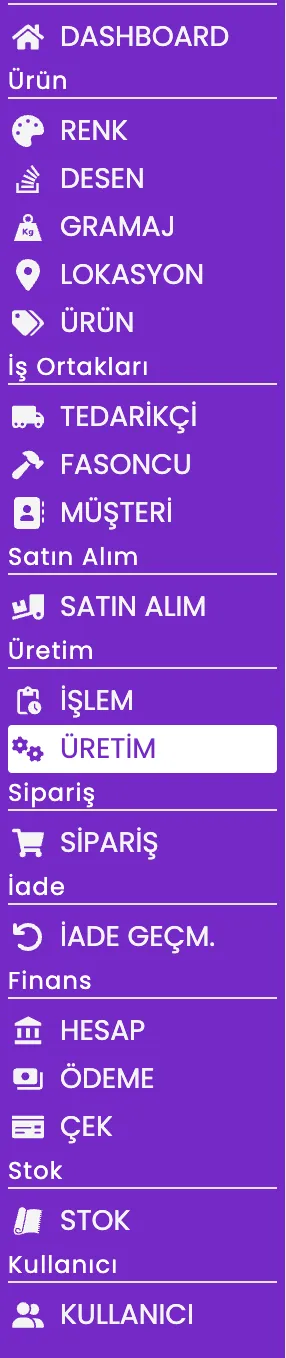
The management panel developed for workflow automation should display pending tasks, approvals, process statuses, and errors to the user. We plan access so that users see only the data and operations their tasks require.
- Monitoring of order, stock, and quotation statuses
- User roles and approval authorities
- Failed transactions and retry records
- Transaction history and related record links
- Process-based reporting and filtering
At Cloud Bilişim, we can design interfaces in Figma around your screen and workflow needs. The panel is not limited to e-commerce. Instead, its scope follows how your sales, production or operations teams work.
Order–stock–invoice automation example
In a sample flow, the system checks the product and customer information of an approved order. Next, it transfers the stock record to the relevant system and starts the invoice preparation step. If information is missing or stock does not match, the flow sends the case to an authorised person for review.
The same order notification may arrive more than once, so the design needs controls that prevent duplicate records. If a connection drops, your team should monitor the process status and the retry result. This is a sample scenario, and the integration scope depends on the capabilities of your systems.
Targets and Measurement in the Automation Project
How do you measure the success of automation?
First, measure the current operation, then compare the same indicators after implementation. This way, you judge the benefit by workflow results rather than general productivity claims.
- Time spent per transaction
- Number of steps with manual data entry
- Number of erroneous or duplicate records
- Waiting time for approval
- Failed data transfers and resolution time
How to plan business process automation?
Process and scope analysis
We define the event that starts the task, the information it needs, the people responsible and the completion condition. Besides normal operation, we also define cases such as cancellation, missing information and disconnection. Choosing a flow with defined boundaries in the initial stage facilitates evaluating the outcome.
System connections and development
We examine the API and data transfer capabilities of your CRM, ERP, accounting or other applications. Then we set permissions, data mappings and the order of operations. We develop the management panel and approval steps together with this flow.
Testing and deployment
Tests cover error and retry scenarios as well as normal operations. We verify which record each system created. Finally, we agree on maintenance responsibilities, process tracking and the procedure for manual intervention.
How do you choose a business process automation company?
When you evaluate a company, examine its work on similar processes, its integration experience and its delivery conditions. Look for answers to the following questions in the proposal:
- Which processes and system connections does the scope cover?
- How will the system handle failed and repeated transactions?
- Which steps will need human approval?
- How will you monitor user permissions and transaction history?
- How will the provider handle API changes, maintenance and support?
The service on this page covers organisation-specific CRM, ERP, production management and B2B workflows. For broader application development needs, see our custom software development service.
Business process automation cost
The cost of business process automation depends on the steps to automate, system connections, approval rules, data quality and reporting requirements. Also budget for products that require API access or licences. Separately showing the development fee and maintenance and operational costs in the proposal makes comparison easier.
A single flow through a ready-made connection and a custom application that spans several departments differ in scope. To estimate price and duration, we review process examples and the systems you use.
Frequently asked questions
Which business processes can be automated?
Good candidates are repeated tasks such as quote tracking, order processing, stock updates, task assignment and reporting. However, suitability depends on data access, clear rules and how you handle exceptions.
Is it necessary to change the existing ERP or CRM software?
Not always. If your current product offers suitable API or data transfer capabilities, we can develop a connection. In contrast, closed or old systems may need additional development or a different transfer method.
Is artificial intelligence necessary for business process automation?
No. Classic software automation can run many processes that follow clear rules. AI is worth considering for steps that need text classification, document summarisation or draft responses. Our AI integration page explains these use cases.
What is the difference between n8n and custom automation software?
n8n is a workflow tool that builds flows between applications. Custom automation software, on the other hand, can include business-specific screens, data models and business rules. Base the choice on the available connection capabilities and the scope of your need. No single approach fits every project.
What happens when automation makes a mistake?
The project defines error situations from the start. The design can stop the process, notify the authorised person or run a controlled retry. Your team should also monitor the operation history to prevent duplicate entries and inconsistent data.
Start your business process automation project
Share the systems you use, the start and end steps of the process, the approximate number of transactions and the most frequent issue. Discuss the scope of your business process automation project with Cloud Bilişim.
Let's Discuss Your Automation Project