



Business email solutions and migration
Cloud Bilişim provides business email setup and migration for organisations in Türkiye. We compare Microsoft 365, Google Workspace and managed email against mailbox requirements, existing data, domain security and administration needs.
What is needed to plan a business email migration?
Prepare mailbox numbers and sizes, domain and DNS access, shared addresses and the required cutover window. Agree how historical mail, user devices and authentication records will be checked after migration.
Which business email option should you assess?
| Option | Consider when | Check before choosing |
|---|---|---|
| Microsoft 365 | Your team uses Microsoft collaboration tools. | Mailbox needs, plan features, identity setup and migration scope. |
| Google Workspace | Your team uses Google collaboration tools. | Storage, user requirements, domain setup and migration scope. |
| Managed email | You need domain email with an agreed administration service. | Mailbox capacity, backup, support and included features. |
Related services and next steps
Guest Wi-Fi and hotspot solutions, Business cloud backup, Contact Cloud Bilişim.
What is business email?
Business email uses your own domain, such as [email protected]. Your organisation administers the accounts and can manage access, retention and handover when staff leave. Cloud Bilişim sets up Microsoft 365, Google Workspace, self-hosted mail servers and managed email services. The scope of administration, backup and archiving is agreed for the selected platform.
Business email keeps account administration with your organisation. Staff handover should include access changes and agreed retention or archiving, subject to the service configuration and your data-handling policy.
Domain authentication is another important difference. SPF, DKIM and DMARC support verification and help reduce spoofing; delivery still depends on sender reputation, message content and recipient policies.
Microsoft 365, Google Workspace, a mail server running on your own server, and a company-specific hosted mail service are all provided, the setup is performed, and maintenance is handled by us.
Which Option Suits You?
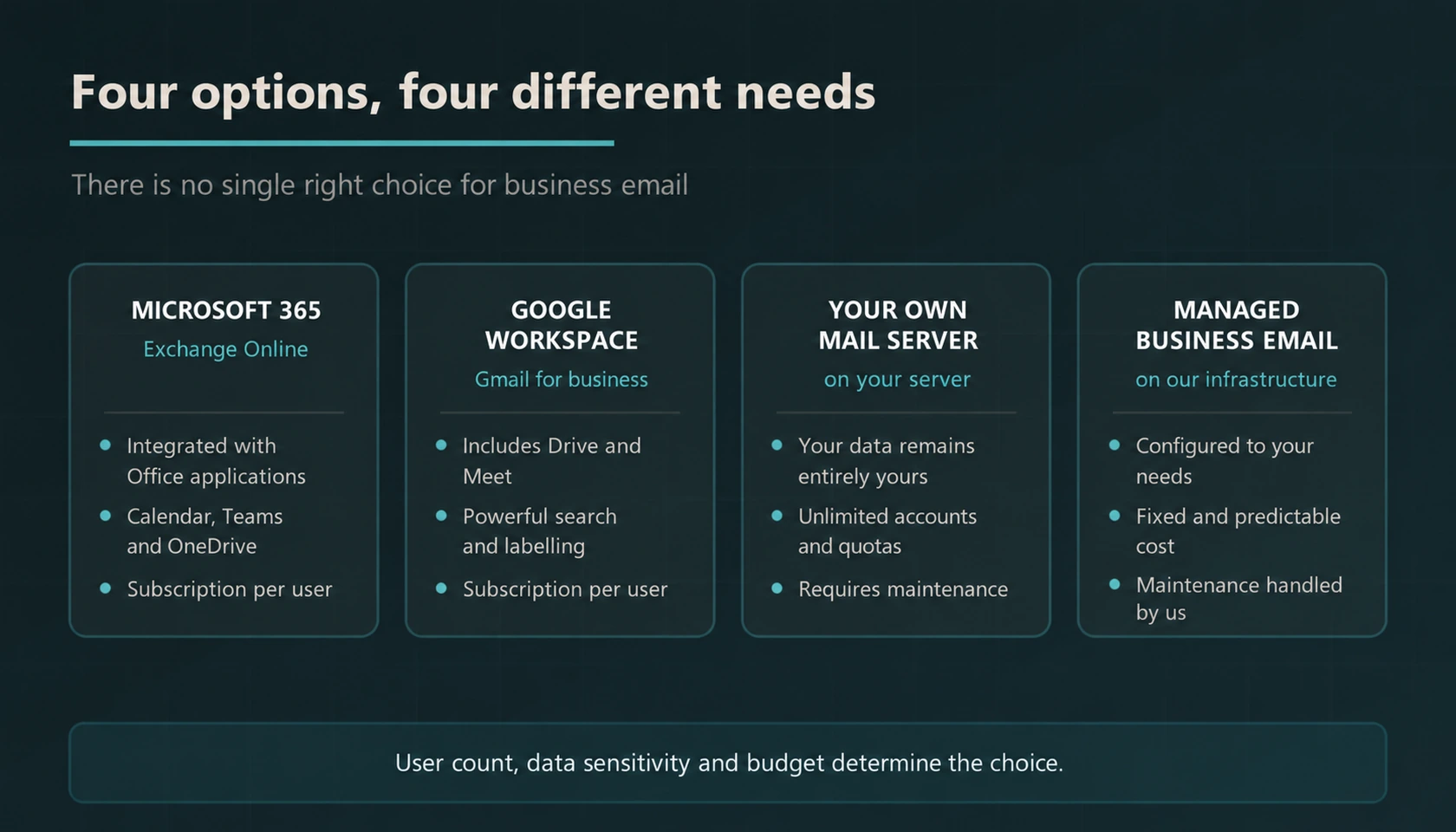
| Option | Where is the data | Who handles maintenance | Suitable for whom |
|---|---|---|---|
| Microsoft 365 | Microsoft infrastructure | On the provider | Organisations integrated with Office and Teams |
| Google Workspace | Google infrastructure | On the provider | Teams using Drive and Meet, search-focused teams |
| Your own mail server | On your server | With you or with us | Structures where data must remain in the organisation |
| Company-specific mail | On our infrastructure | With us | Businesses seeking an agreed hosting and maintenance scope |
Why Do My Emails Go to Spam?
Email delivery depends on authentication, sender reputation, message content and the receiving service's filters. SPF, DKIM and DMARC are important controls, but configuring them does not guarantee delivery to the inbox.
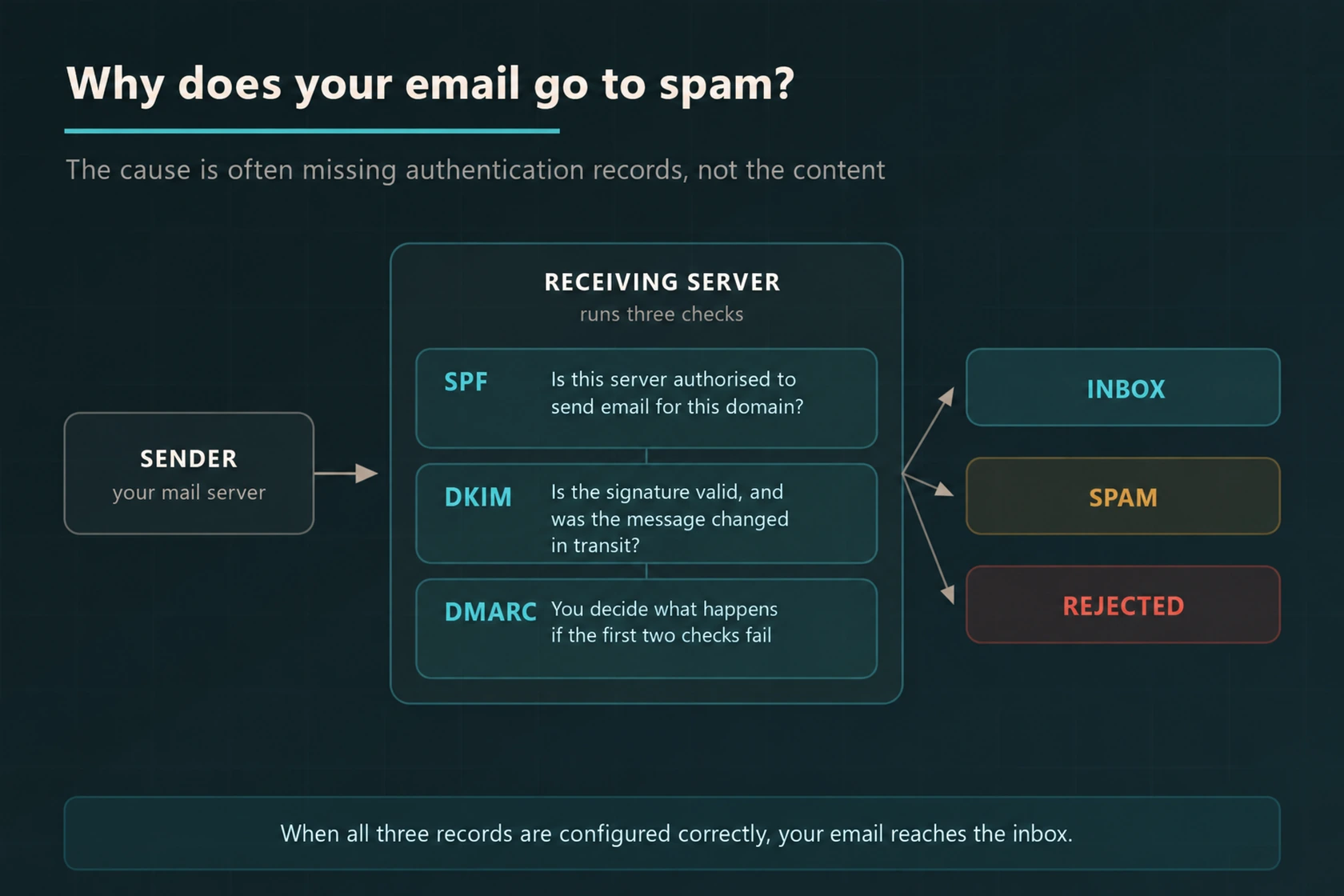
SPF
It is a DNS record that lists which servers are allowed to send email on behalf of your domain. Mail coming from a server not on the list is considered suspicious.
DKIM
Adds a digital signature to every outgoing message. The recipient’s server verifies this signature to understand that the message indeed came from you and was not altered in transit.
DMARC
DMARC evaluates SPF or DKIM verification along with domain alignment. The domain owner can specify a policy for failed messages and receive reports; the final action depends on the recipient system’s evaluation.
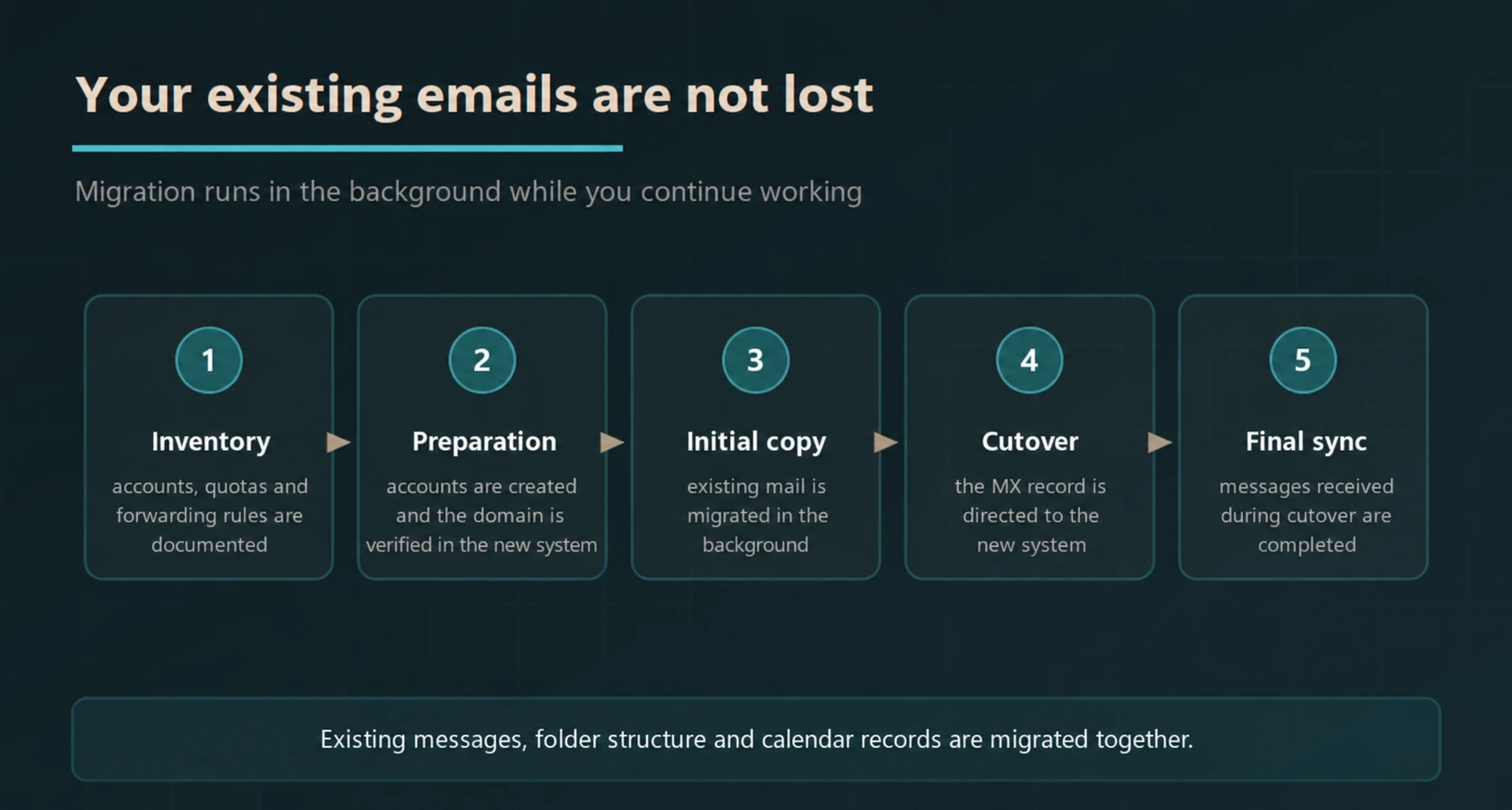
Can My Existing Emails Be Transferred?
We plan the migration around the source platform, mailbox sizes and supported data types. Agree which emails, folders, contacts and calendars can be transferred, schedule the cutover and verify the result. Temporary disruption or user reconfiguration may be required.
Scope of Our Service
- Needs Analysis and Selection
The appropriate option is determined by evaluating the number of users, quota requirements, data sensitivity, and budget. - Microsoft 365 Setup
Subscription, domain verification, mailboxes, distribution groups, and shared mailboxes are configured. - Google Workspace Setup
Accounts, organisational units, groups, and sharing policies are established. - Setup of Your Own Mail Server
Mail service is installed on the server, certificates, quotas, and security settings are configured. - Company-Specific Hosted Mail
Mail service is provided on our own infrastructure with a configuration allocated to your organisation. - SPF, DKIM, and DMARC Configuration
DNS records are correctly defined, DMARC reports are monitored, and policy is gradually tightened.
- Mail Migration
The migration scope identifies supported emails, folders, contacts and calendars, with an agreed cutover window and post-migration checks. - Antispam and Phishing Protection
Unwanted mail and phishing attempts in incoming traffic are filtered, rules are regularly updated. - Mailbox Backup
Email, contact, and calendar data are stored in a separate copy and recovery is tested. - User Life Cycle
For personnel joining and leaving, account creation, transfer, archiving, and closure are performed. - Mobile and Desktop Setup
Accounts are set up on phones, tablets, and computers, and users are guided. - Continuous Maintenance
Quota tracking, reputation monitoring, rule updates, and issue intervention are covered under the maintenance agreement.
Corporate emails should also be backed up. The retention and recovery capabilities in Microsoft 365 and Google Workspace services vary depending on the licence and configuration; it should be checked whether these capabilities meet your organisation’s recovery objectives. We recommend keeping a separate backup of mailboxes — for details cloud backup .
What should a business email proposal include?
In addition to mailbox capacity, list shared mailboxes, calendar, mobile usage, archiving, and backup needs. It should be checked through the product terms which package includes these features and whether additional licences are required.
In the migration plan, not only emails but also the people, calendars, and shared mailboxes to be transferred should be defined. Domain name and DNS management, administrator account ownership, and the parties who will provide support during the migration should be clarified from the start.
Authentication settings such as SPF, DKIM, and DMARC should be evaluated; however, these records alone do not guarantee that every message will reach the inbox. Sending-receiving tests during delivery, user access, and options for exporting data when leaving the service should also be checked.
Frequently Asked Questions
What is corporate email, and how does it differ from free email?
Business email uses your own domain, such as [email protected]. Your organisation controls account administration and can arrange staff handover, authentication, retention and backup according to the chosen service.
Which corporate email option should I choose?
Compare Microsoft 365, Google Workspace, a self-hosted server and managed email against your users, existing tools, data requirements and budget. Confirm storage, backup, support and migration responsibilities for each option before choosing.
Should I set up my own mail server?
If the data must not go to any external service, if you need a large number of accounts and a big quota, or if you are going to set up custom integrations, your own mail server is logical. On the other hand, the server requires constant maintenance, security updates, spam management, and reputation monitoring. If there is no structure to take on this burden, hosted options are healthier. For the server side cloud server services .
Why do my emails go to the spam folder?
Spam filtering considers authentication, sender reputation, message content and recipient policies. SPF, DKIM and DMARC should be configured and checked, but correct records alone do not guarantee inbox delivery.
What are SPF, DKIM, and DMARC?
SPF identifies authorised sending servers. DKIM lets a receiving server verify a message signature. DMARC checks alignment with the visible From domain and publishes a policy and reporting preferences. The receiving service determines how a message is handled.
Can my existing emails be transferred?
Existing email can usually be migrated, subject to the source and destination systems and the chosen migration method. Confirm the supported data types, pilot a mailbox, agree a cutover window and check the transferred data. Contacts and calendars may require a separate method.
Are corporate emails backed up?
Retention and recovery capabilities in Microsoft 365 and Google Workspace services vary depending on the licence and configuration; it should be checked whether these capabilities meet your organisation’s recovery objectives. Therefore, we recommend keeping a separate backup of the mailboxes and we implement this backup.
What does mail maintenance cover?
Opening, closing, and authorising accounts, quota tracking, managing distribution groups and shared mailboxes, updating spam and phishing rules, monitoring the accuracy of SPF, DKIM, and DMARC records, tracking sending reputation, verifying backups, and intervening in case of problems are included in the maintenance scope.
Our Relevant Services
For the infrastructure on which your own mail server will run cloud server servicesFor backing up mailboxes cloud backupFor phishing and malicious attachment protection AI-based antivirus programs and Business firewall solutionsFor Microsoft 365 and Google Workspace licences software licensing solutionsFor continuity of account management corporate maintenance agreement services You can check our pages.
Let’s Check Your Mail Infrastructure for Free
Are your SPF, DKIM, and DMARC records defined and correct? How many of your emails land in the inbox? Are you protected against fake emails sent in your name? We examine the current records of your domain and report the deficiencies.
For control and offer you can contact us.