



Business cloud backup
Cloud Bilişim provides cloud backup for businesses that need an off-site copy of their data. Backup frequency, retention, access controls and recovery objectives are agreed around the organisation’s systems, available bandwidth and restore requirements.
How should cloud backup costs and recovery be compared?
Compare stored capacity, retention, transfer charges where applicable and the time needed to restore a representative workload. Check access controls and restore tests as well as whether backup jobs complete.
Related services and next steps
Managed cloud server services, Business email solutions and migration, Contact Cloud Bilişim.
What is Cloud Backup?
Cloud backup is the copying and storing of enterprise data to a cloud infrastructure over the internet after encryption. The copy stays outside the business building.
The main emphasis in this sentence is on the “outside the building” part. Local backups solve most everyday accidents: deleted file, damaged disk, incorrectly saved document. However in events that affect the entire building — In the event of a fire, flood, theft, or ransomware spreading across the entire network — the local copy is also lost.
Cloud backup is exactly for this scenario. It goes unnoticed in daily use, but on a bad day, it is the only thing you have left.
We store the backups as needed Amazon S3 and for archive S3 Glacier, Microsoft Azure on storage or Google Cloud Storage on
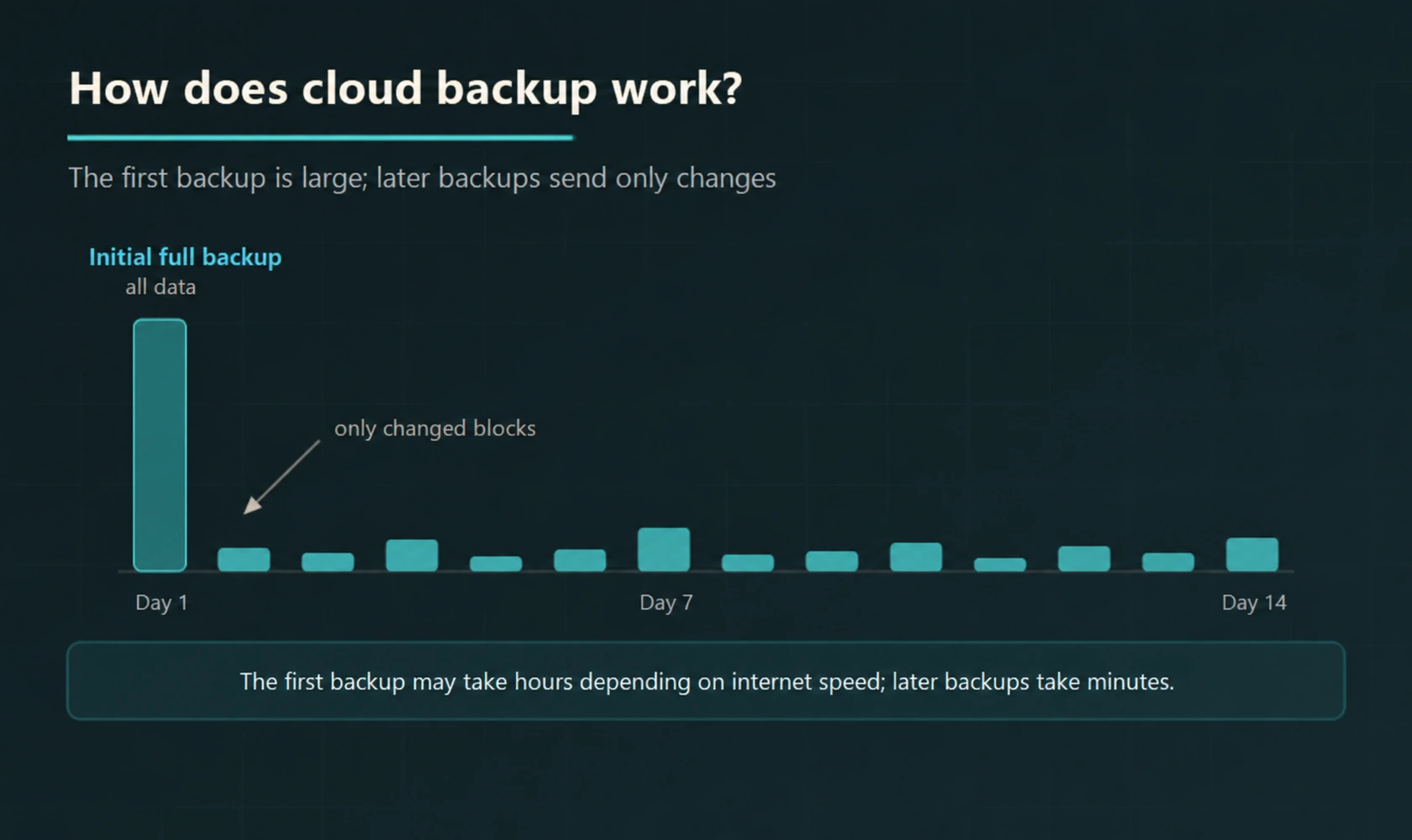
The first backup sends all the data; the subsequent ones only carry the changed blocks.
How Long Does the First Backup Take?
It depends on the volume of data and internet upload speed; it can take from a few hours to several days. We schedule this first transfer during non-working hours or define a bandwidth limit to ensure it does not affect workflow during working hours.
After the initial backup is completed, the system works incrementally: only the changed blocks are sent, and the duration of daily backups depends on the amount of changed data and connection speed.
How to Control Cost?
In cloud backup, cost is determined by the volume of stored data and retention period. The key to control is storage tiers: not all data needs to be accessible at the same speed.
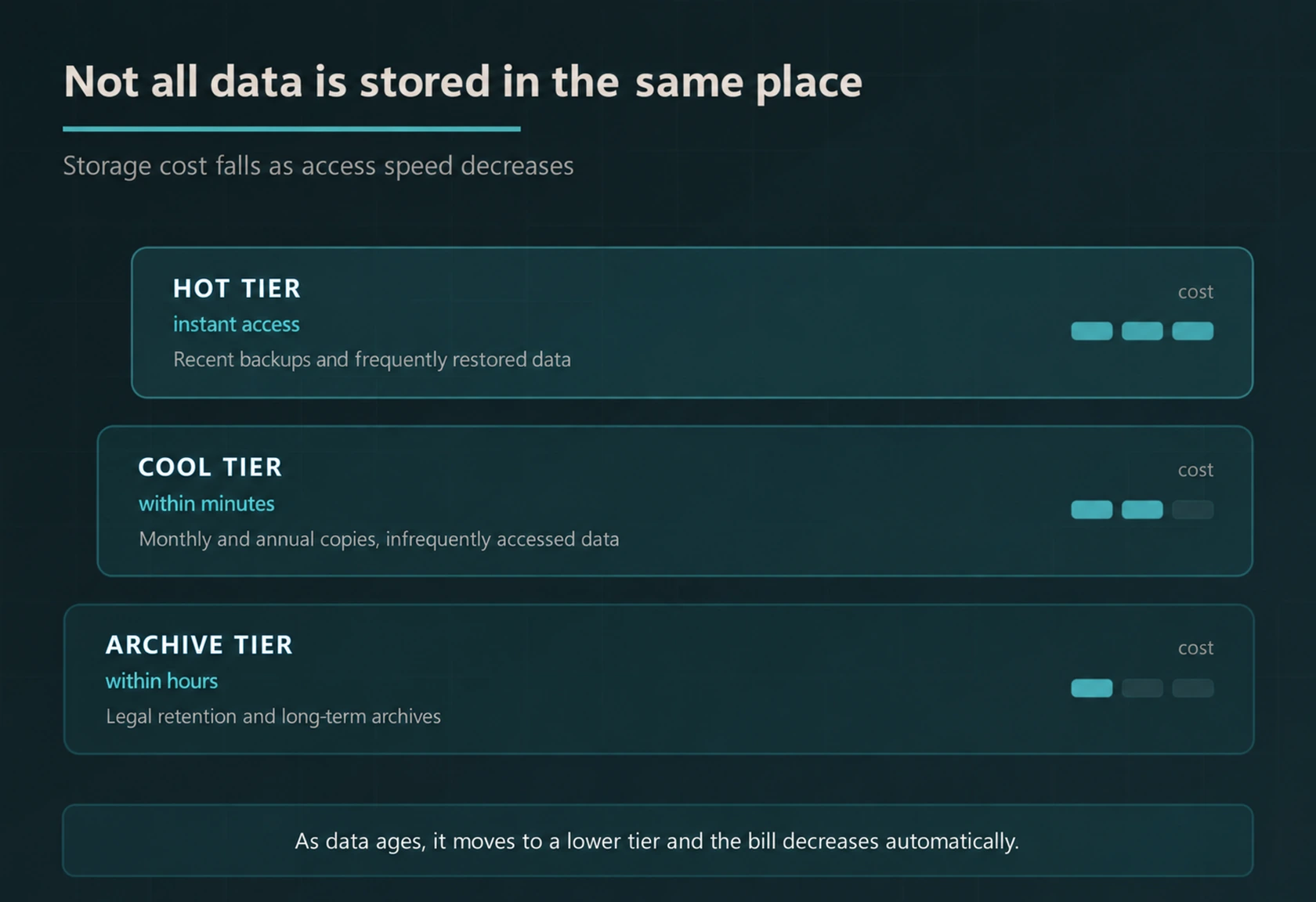
In practice, this means: backups from recent days reside in the hot tier with instant access, monthly and yearly copies move to the infrequent tier, and long-term archives required by legal retention wait in the cheapest tier. When lifecycle rules are defined, this movement becomes automatic and costs are managed by evaluating storage, processing, and data access fees together.
Can Ransomware Encrypt My Cloud Backup Too?
Separate access permissions, versioning, and proper immutability settings reduce the risk of the cloud backup being affected by an attack. Two measures are taken for this.
Versioning
Each backup is stored as a separate version. Even if the file is uploaded to the cloud in its encrypted form, the version before encryption remains there, and it can be restored to that version.
Immutable Copy
Critical copies are marked as undeletable and immutable for a specified period. The behaviour of this protection against admin accounts should be verified according to the service and lock mode used.
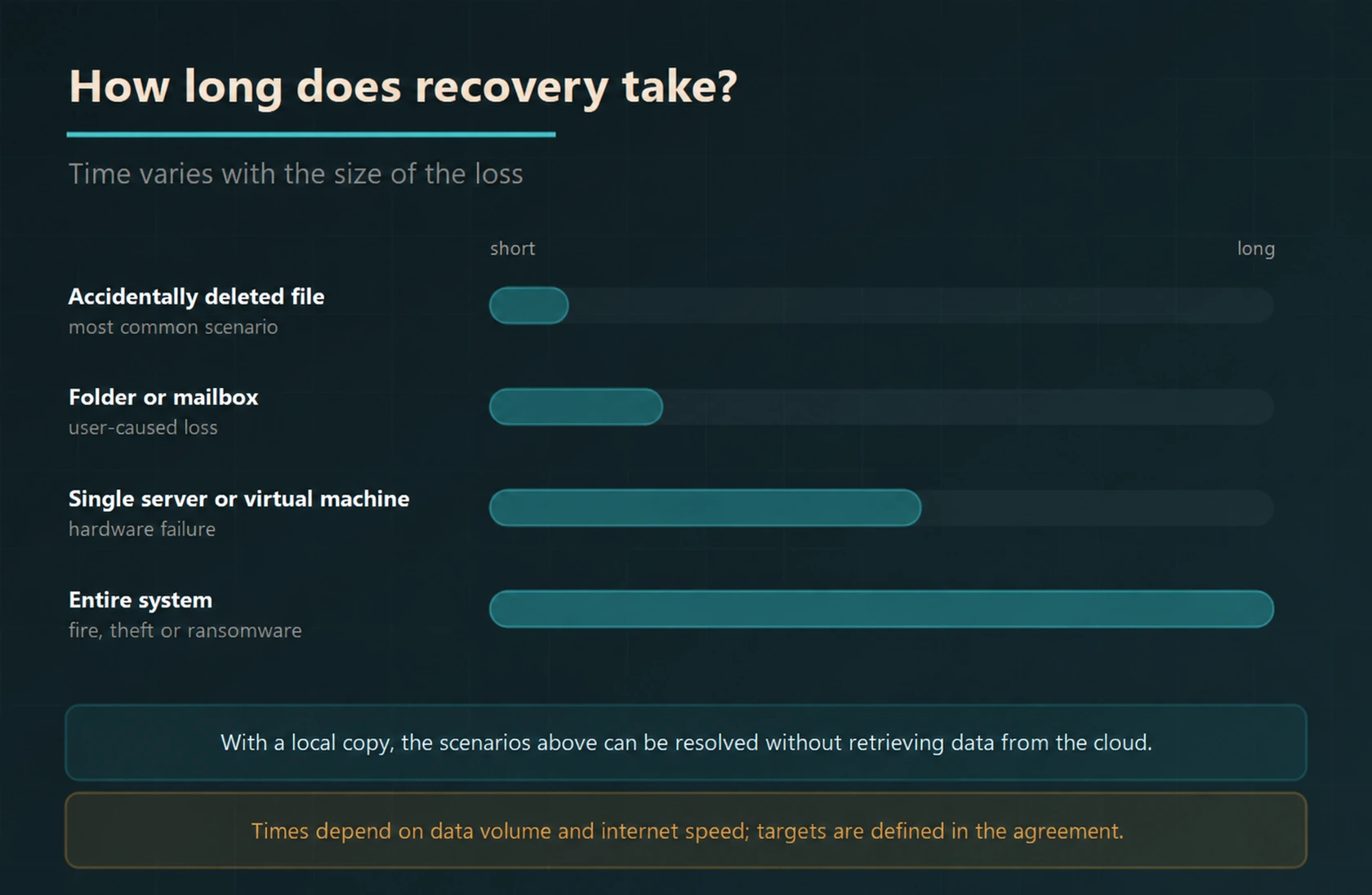
How Long Does It Take to Restore?
What Is Backed Up?
| Source | What is backed up | Typical restoration |
|---|---|---|
| Physical servers | Operating system, applications, data — as a whole | Single file or entire server |
| Virtual machines | Entire virtual machine, in working state | Entire machine, even to different hardware |
| Databases | With consistent snapshots | To a specific point in time |
| File servers and NAS | Shares and permissions | Folder or single file |
| Computers | User files and profile | File or entire device |
| Microsoft 365 | Email, OneDrive, SharePoint, Teams | Mailbox or single item |
| Google Workspace | Gmail, Drive, shared spaces | Account or single file |
Scope of Our Service
- Data and Target Analysis
Which data will be backed up, how often, and how long it will be kept; RPO and RTO objectives are determined. - Provider and Region Selection
The appropriate option from Amazon, Microsoft, or Google infrastructure and the region where the data will be stored are decided together. - Agent Installation and Initial Backup
Agents are installed on the server and devices, and the first full backup is planned in a way that does not affect workflow. - Incremental Backup Plan
Daily, weekly, and monthly copy schedules are set up; bandwidth limits are defined. - End-to-End Encryption
Data is encrypted before leaving the device; key management is configured in favor of the organisation. - Immutable Copy
Indelible and unchangeable copies are created against ransomware.
- Tier and Lifecycle Rules
As data ages, it is automatically moved to a lower tier; storage costs are kept under control. - Monitoring and Alert
Failed backup jobs are reported immediately; failed jobs are evaluated through monitoring warnings and restore tests. - Restore Test
Actual restores are performed at regular intervals and the results are reported. - Disaster Recovery Plan
It is documented where, in what order, and by whom the entire system will be restored. - Cost Reporting
Stored volume and tier distribution are reported regularly; usage and transfer costs are monitored to try to reduce unexpected expenses. - Continuous Support
Within the scope of the maintenance agreement, the system is monitored and, if necessary, restore operations are carried out by us.
Data location and KVKK. The country in which the data will be stored in cloud providers is determined by the region selection. Under KVKK, transferring data abroad is subject to special rules; therefore, we decide on the appropriate region together according to your institution’s policy and the nature of the data, and we record the selection in writing. For definite obligations, we recommend that you evaluate it together with your legal advisor.
Cloud backup quotation and return calculation
Do not compare the cloud backup quotation only with the monthly storage. The initial transfer time, the amount of daily changing data, version retention policy, and restore requirement affect the total cost.
The waiting time for retrieving data from the archive layer, callback and data transfer fees may vary depending on the provider and the package used. For critical systems, it should be tested whether the targeted return time can be met with the selected layer and internet connection.
The management of the backup account, responsibility for encryption keys, and export of data when the service is terminated should be discussed during the proposal phase. Immutable copy settings and separate access rights reduce risk; they do not replace a tested recovery plan.
Frequently Asked Questions
What is cloud backup?
Cloud backup is the process of encrypting corporate data, copying it to a cloud infrastructure over the internet, and storing it there. Since the copy is kept outside the company’s building, it provides a separate copy against local incidents such as fire, flood, and theft; account and copy security are also necessary against cyber attacks.
How does cloud backup work?
A small agent is installed on the servers and computers to be backed up. During the first run, all data is sent; this initial backup takes the longest. In subsequent backups, only the changed blocks are transferred, so daily backups take much less time and do not occupy bandwidth.
How long does the first backup take?
It depends on the volume of data and the internet upload speed; it can take anywhere from a few hours to a few days. The first backup is usually scheduled outside of working hours or configured with a bandwidth limit so that workflow during working hours is not affected. The duration of subsequent backups depends on the varying amount of data and connection speed.
Are my data safe in the cloud?
Data is encrypted before leaving the device, remains encrypted during transfer, and is stored encrypted in the cloud. When the encryption key is kept by the organisation, no one, including the service provider, can read the content. Additionally, unalterable copies that cannot be deleted for a specified period can be created.
Can ransomware also encrypt my cloud backup?
Separate access permissions, versioning, and appropriate immutability settings reduce the risk of cloud backups being affected by attacks. For this, two measures are taken: backups are kept in versions, so that a state before encryption can be restored; and critical copies are marked as immutable, with deletion and modification restrictions configured according to the service used, lock mode, and permissions.
How is the cost of cloud backup calculated?
The cost is basically determined by the volume of data stored and the retention period. Storage tiers are decisive here: backups of the last days are kept in the hot tier with instant access, monthly and yearly copies in the infrequent tier, and long-term archives in the lowest-cost archival tier. As data ages, it is moved to a lower tier, and the saving potential is assessed based on data access frequency and provider fees.
In which country are my data stored?
In cloud providers, the data location is determined by selecting a region. Transfer of data abroad is subject to special rules under KVKK; therefore, the appropriate region is decided together according to your institution’s policy and the nature of the data, and the selection is recorded in writing.
I have a NAS, do I still need cloud backup?
Yes. NAS provides fast recovery but is located in the same building as the business; in the event of fire, flood, theft, or ransomware affecting the entire network, the NAS can also be lost. The healthiest setup is a hybrid structure using both: daily backups are carried out locally, while disaster scenarios are handled via the cloud. For details backup and storage solutions .
Our Relevant Services
For local storage and hybrid architecture backup and storage solutionsFor the cloud infrastructure itself cloud server servicesFor the email side Enterprise mail solutionsTo stop ransomware before it reaches the backup AI-based antivirus programs and Business firewall solutionsFor monitoring the entire system corporate maintenance agreement services You can check our pages.
Do you have a copy outside the building?
If a fire broke out in your building today, what would remain in your hands? We review your current backup status, determine your data volume and objectives, and prepare a cloud backup plan with predictable costs using the appropriate provider and tier structure.
For evaluation you can contact us.